
Best AI Tools for Content Creators in 2026
Content creation has become an important part of digital marketing, online business, and personal branding. Whether you run a YouTube channel, publish blog posts, create social media content, or manage a business website, producing high-quality content consistently requires time, creativity, and the right tools.
Artificial intelligence is making this process easier. Modern AI tools can help creators brainstorm ideas, write articles, generate images, edit videos, create social media posts, and analyze content performance. Tasks that once required several applications and hours of manual work can now be completed more efficiently with AI-powered software.
The best part is that many platforms offer free plans or trial options, allowing beginners to experiment without making a large investment.
In this guide, we explore the best AI tools for content creators in 2026, their features, benefits, and practical uses. Whether you are a blogger, YouTuber, freelancer, influencer, or digital marketer, these tools can help you improve your creative workflow.
Table of Contents
What Are AI Tools for Content Creators?
AI tools for creators are software applications that use artificial intelligence to support different stages of content production, from planning and research to creation, editing, publishing, and performance analysis.
These tools can help creators generate ideas, transform text into visuals, summarize information, improve audio quality, and automate repetitive tasks.
Depending on the platform, AI-powered content creation tools can support:
- Blog writing and article outlining
- Social media captions and post ideas
- Video editing and short-form video creation
- AI-generated images and illustrations
- Voiceovers and audio enhancement
- Presentation and graphic design
- Search engine optimization (SEO)
- Content repurposing and workflow automation
- Audience engagement and content analysis
Instead of replacing creativity, AI can serve as a practical assistant that helps creators spend less time on repetitive tasks and more time developing original ideas.
Best AI Tools for Content Creators in 2026
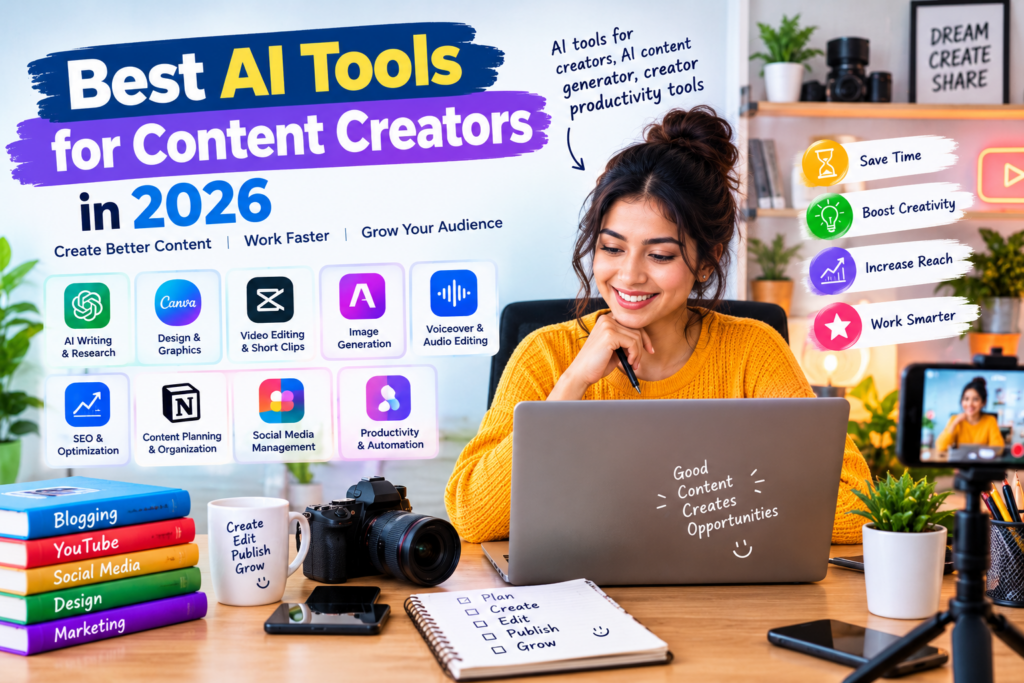
Here are some popular AI-powered platforms that creators can use to improve their content creation process.
1. ChatGPT — Best for Writing and Brainstorming
ChatGPT is a versatile AI assistant that can help creators brainstorm ideas, outline articles, develop video scripts, write social media captions, and refine existing content.
For example, a blogger can use it to generate article outlines, while a YouTuber can develop video concepts and draft scripts. Social media managers can also use it to brainstorm campaign ideas and adapt content for different audiences.
ChatGPT is particularly useful when you need help moving from a rough idea to a structured first draft.
Key Features:
- Generate content ideas and outlines.
- Draft blog posts and video scripts.
- Create social media captions.
- Rewrite and improve existing text.
- Summarize research and organize information.
- Adapt writing for different audiences and formats.
Best For: Bloggers, writers, YouTubers, freelancers, and digital marketers.
Pricing: Free access is available, with additional features and higher usage limits offered through paid plans.
2. Canva — Best for Graphic Design
Canva is a popular design platform that helps creators produce visually appealing content without advanced graphic design skills.
Its design templates and AI-powered features can support the creation of YouTube thumbnails, Instagram posts, presentations, promotional graphics, and blog images.
Creators can combine text, images, illustrations, and brand elements in one workspace, making it easier to maintain a consistent visual identity.
Key Features:
- Ready-made templates for social media and marketing.
- AI-assisted design and content features.
- Presentation and infographic creation.
- Photo editing and visual customization.
- Brand kits and reusable design elements.
- Tools for creating thumbnails and promotional graphics.
Best For: Social media creators, bloggers, influencers, and small businesses.
Pricing: A free plan is available. Access to premium assets and certain AI features depends on the plan.
3. Adobe Firefly — Best for AI Image Creation
Adobe Firefly helps creators generate and edit images using text prompts and supported generative tools.
It is useful for developing visual concepts, creating illustrations, experimenting with different styles, and editing images for creative projects.
For example, a blogger could generate a custom featured-image concept, while a marketing professional could explore different visual directions for an advertising campaign.
Key Features:
- Generate images from text descriptions.
- Explore different artistic styles.
- Use supported generative editing tools.
- Create visual concepts for campaigns.
- Integrate AI-generated assets into compatible Adobe workflows.
Best For: Designers, bloggers, digital artists, and marketing teams.
Pricing: Limited free access or introductory generative credits may be available, depending on the current offering.
4. CapCut — Best for Short-Form Video Editing
CapCut is a video editing platform widely used to create short-form videos and social media content.
Its editing tools and supported AI features can help creators produce videos for platforms such as YouTube, Instagram, and TikTok.
Creators can use it to trim footage, add subtitles, improve presentation, and assemble videos more efficiently.
Key Features:
- Video editing and trimming.
- Automatic captioning where supported.
- Templates and visual effects.
- AI-assisted editing features.
- Tools for short-form social media videos.
- Audio and text enhancements.
Best For: YouTubers, short-form video creators, influencers, and social media managers.
Pricing: Free features are available, while some tools and assets require a paid plan. Availability varies by region and platform.
5. Descript — Best for Editing Videos and Podcasts
Descript offers an editing workflow that allows creators to work with audio and video through text-based editing and other production tools.
Instead of relying entirely on a traditional timeline, users can edit supported recordings by working with their transcripts.
This can be especially helpful for podcasters, educators, and video creators who produce interviews, tutorials, and talking-head videos.
Key Features:
- Text-based audio and video editing.
- Transcription and captioning.
- Podcast and interview editing.
- Audio cleanup features.
- Tools for preparing and repurposing recordings.
- AI-assisted production features.
Best For: Podcasters, educators, interviewers, and YouTube creators.
Pricing: Free access may be available with usage limits. Paid plans offer additional capabilities.
6. Grammarly — Best for Writing Improvement
Grammarly helps creators improve the clarity, correctness, and readability of their writing.
It can identify grammar issues, suggest wording improvements, and support different writing styles. Depending on the available plan, its AI features can also help users draft and revise text.
For creators who publish articles, newsletters, business communications, or social media content, Grammarly can serve as a useful editing assistant.
Key Features:
- Grammar and spelling suggestions.
- Clarity and readability improvements.
- Tone and style feedback.
- AI-assisted writing support.
- Writing assistance across supported applications.
Best For: Bloggers, freelance writers, newsletter publishers, and marketing professionals.
Pricing: A free version is available, with additional features offered through paid plans.
7. Jasper — Best for Marketing Content
Jasper is an AI writing platform designed primarily for marketing and business content.
It can help teams develop campaign ideas, draft marketing copy, and maintain a consistent brand voice across different types of content.
For example, a marketing team could use it to develop promotional messages, email drafts, advertising concepts, and social media copy.
Key Features:
- AI-assisted marketing copywriting.
- Campaign and content ideation.
- Brand voice features.
- Support for different marketing formats.
- Content development workflows for teams.
Best For: Marketing professionals, agencies, and businesses producing content at scale.
Pricing: Paid plans are available; trial options and access conditions may change.
8. ElevenLabs — Best for AI Voiceovers
ElevenLabs provides AI-powered voice generation and audio tools that creators can use to produce voiceovers for videos, explainers, and other audio content.
It can be useful for creators who want to experiment with narration without recording every line themselves.
Creators should review the relevant usage permissions and obtain appropriate consent when using voice cloning or voice-related features.
Key Features:
- AI-generated speech.
- Natural-sounding voice options.
- Voiceover production for videos.
- Audio-related creative tools.
- Support for multiple languages, depending on the feature.
Best For: Video creators, educators, audiobook producers, and podcasters.
Pricing: Limited free access may be available, with additional usage and features offered through paid plans.
9. Surfer — Best for SEO Content Optimization
Surfer is an SEO content optimization platform that helps writers plan and improve articles using search-related insights.
It can support creators who want to structure website content around relevant topics and improve the alignment between their articles and search intent.
It is most useful when combined with original research, accurate information, and a clear understanding of the target audience.
Key Features:
- Content optimization recommendations.
- Topic and keyword research features.
- Content structure analysis.
- Tools for improving on-page SEO.
- Support for content planning and auditing.
Best For: Bloggers, SEO specialists, publishers, and content marketing teams.
Pricing: Primarily paid, with available plans and features subject to change.
10. Notion AI — Best for Content Planning and Organization
Notion is a workspace for organizing notes, documents, projects, and team information. Its AI features can help creators summarize notes, develop ideas, and organize information.
Creators can use it to maintain an editorial calendar, track content ideas, manage publishing schedules, and coordinate work across projects.
This makes it particularly useful for creators who want to organize their entire content workflow in one place.
Key Features:
- Notes and document organization.
- AI-assisted summarization and drafting.
- Content calendars and project tracking.
- Task management.
- Collaborative workspaces.
Best For: Bloggers, content strategists, freelancers, and creative teams.
Pricing: Notion offers free workspace options. AI feature availability and usage depend on the current plan.
Comparison of the Best AI Tools for Content Creators
The following table summarizes which tools are worth considering for different creative needs.
| AI Tool | Best Use Case | Main Benefit | Free Access |
|---|---|---|---|
| ChatGPT | Writing and brainstorming | Versatile content assistance | Available with limits |
| Canva | Graphic design | Templates and visual creation | Yes, with limitations |
| Adobe Firefly | Image generation | AI-powered visual creation | Limited access may be available |
| CapCut | Video editing | Short-form video production | Free features available |
| Descript | Audio and video editing | Transcript-based editing | Limited access may be available |
| Grammarly | Writing improvement | Grammar and clarity support | Yes, with limitations |
| Jasper | Marketing copy | Marketing-focused writing tools | Check current offers |
| ElevenLabs | Voiceovers | AI-generated speech | Limited access may be available |
| Surfer | SEO optimization | Content optimization insights | Primarily paid |
| Notion AI | Content organization | Planning and workflow management | AI access varies by plan |
Important: Pricing, free usage limits, regional availability, and AI features can change. Check the providers’ current terms before selecting a tool.
Benefits of Using AI Tools for Creators
AI tools can improve several stages of the content creation process. When used thoughtfully, they help creators work more efficiently while preserving their individual style.
1. Save Time on Content Creation
Creating content involves research, outlining, writing, editing, designing, and publishing.
An AI assistant can help brainstorm topics, prepare initial drafts, summarize research, and generate creative options. Video and design tools can also reduce the time needed for editing and formatting.
This allows creators to spend more time on storytelling, strategy, and audience engagement.
2. Generate Fresh Content Ideas
Coming up with new topics can be challenging, especially when you publish frequently.
An AI content generator can suggest blog topics, video concepts, social media campaigns, and newsletter ideas based on your niche and audience.
For better results, provide context about your target audience, content goals, and preferred style rather than relying on generic prompts.
3. Improve Visual Content
AI-powered design tools make it easier to experiment with illustrations, thumbnails, promotional graphics, and other visuals.
Creators can develop different concepts quickly and choose the designs that best match their brand.
However, AI-generated visuals should still be reviewed for incorrect details, visual inconsistencies, and inappropriate use of protected material.
4. Repurpose Content Across Platforms
A single piece of content can often be adapted into multiple formats.
For example, a long YouTube video could become several short clips, a blog article, a newsletter summary, and social media posts.
AI tools can help prepare these variations, although each version should be adapted to the audience and format of the destination platform.
5. Improve Creator Productivity
Creator productivity tools can help manage deadlines, organize content ideas, track projects, and reduce repetitive administrative work.
When writing, design, editing, and planning tools work together, creators can build a more organized production process.
The result is not necessarily more content at any cost. Instead, the goal is to produce useful, high-quality content more consistently.
How to Choose the Right AI Content Creation Tools
Not every creator needs a large collection of AI applications. The right tools depend on your content format, experience, budget, and workflow.
Consider these factors before choosing a platform.
1. Identify Your Main Content Format
Start by determining what you create most often.
- Bloggers: Prioritize writing, research, editing, and SEO tools.
- YouTubers: Focus on scriptwriting, video editing, thumbnails, and audio.
- Social media creators: Explore design, short-form video, and caption-writing tools.
- Podcasters: Consider transcription, audio cleanup, and editing applications.
- Marketing teams: Look for campaign writing, collaboration, and content planning features.
Choosing tools based on your main activity helps avoid unnecessary subscriptions.
2. Compare Free and Paid Features
Many platforms provide free access with restrictions. Before upgrading, determine whether the free version supports your actual workflow.
Check usage limits, export options, watermarks, available AI features, and the cost of additional credits.
3. Consider Ease of Use
Beginners should prioritize tools with intuitive interfaces, useful templates, and clear documentation.
A tool with advanced features may not be the best choice if it takes too much time to learn or complicates your existing process.
4. Check Integration Options
Look for tools that work well with the applications you already use.
For example, a video editor that supports your publishing workflow or a writing assistant that integrates with your preferred editor may save time.
5. Protect Originality and Accuracy
AI-generated text and images can contain errors or produce results that resemble existing material.
Review facts, check sources, refine generic writing, and make sure the final content reflects your own perspective and expertise.
AI should assist the creative process rather than replace editorial judgment.
How to Use AI to Build a More Efficient Content Workflow
A simple content workflow can help creators combine several tools without making the process unnecessarily complicated.
Here is an example of a workflow for publishing a blog article.
Step 1: Research the Topic
Identify your audience’s needs, examine relevant sources, and develop a clear article angle.
Step 2: Generate an Outline
Use ChatGPT or another AI assistant to brainstorm ideas and organize the article into logical sections.
Step 3: Write and Edit
Develop the article using your own knowledge and research. Use a writing assistant to improve clarity and correct language issues.
Step 4: Optimize for SEO
Use an SEO platform to review keyword relevance, article structure, search intent, and opportunities for improvement.
Step 5: Create a Featured Image
Use Canva, Adobe Firefly, or another suitable image tool to develop a visual that matches the article.
Step 6: Organize and Publish
Track the article in a content calendar, review all information, and publish it through your website’s content management system.
Step 7: Repurpose the Content
Turn the article into social media posts, a newsletter, or a short video script to reach different audiences.
This workflow combines AI assistance with human creativity and review, helping creators maintain quality while reducing repetitive effort.
Common Mistakes to Avoid When Using AI Tools
Although AI can make content production easier, using it without a clear process can lead to disappointing results.
Avoid these common mistakes:
- Publishing unedited AI content: Always review generated text for accuracy, originality, and readability.
- Using generic prompts: Provide specific details about your audience, topic, tone, and desired output.
- Ignoring fact-checking: Verify important claims with reliable sources.
- Overloading your workflow with tools: Start with a few applications that solve your biggest problems.
- Ignoring audience needs: Prioritize helpful, relevant content rather than producing large volumes of generic material.
- Using visuals without reviewing them: Check generated images for mistakes, misleading details, and licensing concerns.
- Forgetting brand consistency: Maintain a recognizable voice, visual style, and message across platforms.
The most effective creators use AI strategically while retaining control over the quality and direction of their work.
Frequently Asked Questions (FAQs)
1. What are the best AI tools for content creators in 2026?
Popular options include ChatGPT for writing and brainstorming, Canva for graphic design, CapCut for video editing, Adobe Firefly for image creation, and Descript for audio and video production.
The best combination depends on the type of content you produce and your budget.
2. Can I create content using AI for free?
Yes. Several AI platforms offer free plans or limited free usage. These options can help beginners experiment with writing, image generation, design, and video editing.
However, some features, exports, and higher usage limits require paid subscriptions.
3. What is an AI content generator?
An AI content generator is a tool that uses artificial intelligence to produce or assist with creating text, images, audio, video, or other content.
Depending on the platform, it can help generate article drafts, captions, scripts, illustrations, and creative concepts.
4. How can AI tools improve content creation?
AI tools can speed up brainstorming, drafting, editing, image creation, video production, and content organization.
They can reduce repetitive work and help creators explore more ideas, but human review remains important for quality, originality, and accuracy.
5. Which AI tools are best for YouTube creators?
ChatGPT can assist with ideas and scripts, Canva can help create thumbnails, CapCut can support video editing, Descript can simplify transcript-based editing, and ElevenLabs can help produce voiceovers.
The best choice depends on your preferred production style and specific requirements.
6. Are AI-generated articles good for SEO?
AI-assisted articles can be useful for SEO when they provide original insights, accurate information, and genuine value to readers.
Simply generating large volumes of generic content is not a reliable SEO strategy. Research, editorial review, helpful information, and search intent should guide the process.
7. Will AI replace content creators?
AI is likely to change many aspects of content production, but creativity, storytelling, personal experience, judgment, and audience relationships remain important.
Creators who learn to use AI effectively can often streamline routine tasks and devote more attention to developing distinctive content.
Conclusion
The best AI tools for content creators in 2026 can simplify writing, graphic design, video editing, audio production, SEO, and content planning.
ChatGPT is a versatile assistant for brainstorming and writing, Canva helps with visual design, Adobe Firefly supports image creation, CapCut is useful for video editing, and Descript offers an alternative approach to audio and video production.
Rather than subscribing to every available application, start with the tools that address your biggest challenges. Experiment with free plans, develop a repeatable workflow, and evaluate whether each tool genuinely saves time or improves your output.
By combining the right AI tools for creators, a capable AI content generator, and effective creator productivity tools, you can build a more efficient content creation process without sacrificing originality or quality.
Ultimately, successful content creation still depends on understanding your audience, sharing useful ideas, and developing a recognizable creative voice. AI can help you work faster, but your perspective is what makes your content stand out.

Pingback: Klap Review: Turn Long Videos into YouTube Shorts with AI - Techgrav