
Taking notes is an essential part of professional work and academic life. Whether you are attending business meetings, preparing for exams, participating in online classes, or managing daily tasks, organizing information efficiently can save valuable time. However, traditional note-taking often requires constant attention, manual typing, and hours of reviewing information.
This is where AI note-taking tools can make a difference. These tools use artificial intelligence to capture conversations, convert speech into text, summarize lengthy discussions, and organize important information automatically.
The best AI note-taking tools for work and study can help professionals improve productivity, students understand complex topics, and teams collaborate more effectively. Features such as AI meeting notes, automatic transcription, and an AI notes summarizer make it easier to focus on conversations instead of worrying about writing everything down.
In this article, we will explore some of the best AI note-taking tools in 2026, their key features, benefits, and how to choose the right option for your needs.
Table of Contents
What Are AI Note-Taking Tools?
AI note-taking tools are software applications that use artificial intelligence to record, transcribe, organize, and summarize information. Depending on the application, they can work with live conversations, online meetings, lectures, voice recordings, documents, and typed notes.
Unlike traditional note-taking applications, AI-powered solutions can automatically identify key points, generate summaries, extract action items, and make information easier to search.
For example, a student can record a lecture and receive a written transcript with a summary of the main concepts. Similarly, a professional can use AI to generate meeting minutes, identify decisions, and create a list of follow-up tasks.
Key Features of AI Note-Taking Software
Most modern AI note-taking tools offer several useful features:
- Automatic transcription: Converts spoken words into written text.
- AI meeting notes: Captures key discussion points, decisions, and action items.
- AI notes summarizer: Turns lengthy recordings and documents into concise summaries.
- Smart organization: Groups notes by topic, project, meeting, or subject.
- Searchable notes: Helps users find specific information quickly.
- Task extraction: Identifies deadlines, responsibilities, and follow-up actions.
- AI-powered search: Allows users to ask questions about their saved notes, where supported.
These capabilities make AI note-taking software useful for students, remote workers, researchers, teachers, and business teams.
Best AI Note-Taking Tools for Work and Study
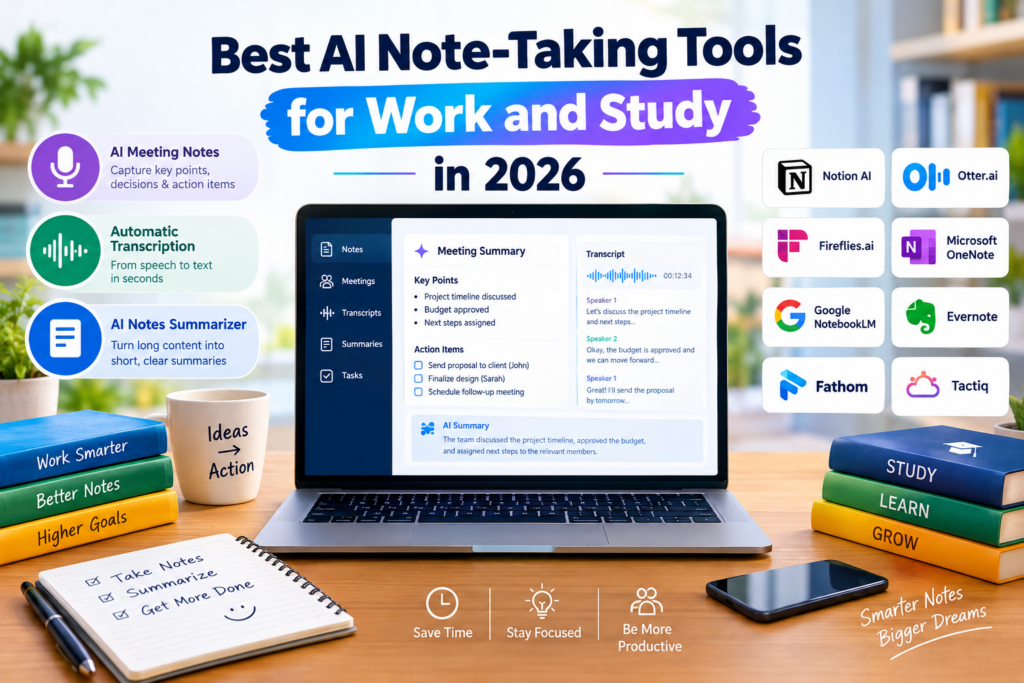
Choosing the right tool depends on your workflow, budget, and preferred features. Some applications are designed for meeting transcription, while others focus on personal knowledge management, studying, or organizing documents.
Here are some of the best options to consider in 2026.
1. Notion AI — Best for Organizing Notes and Projects
Notion is a popular workspace for managing notes, documents, projects, and knowledge bases. Its AI capabilities can help users summarize content, improve writing, extract important information, and organize information within their workspace.
For professionals, Notion can serve as a central location for project documentation, meeting summaries, and team knowledge. Students can use it to organize class notes, create revision materials, and maintain study plans.
Key features:
- AI-assisted writing and summarization.
- Centralized notes and document management.
- Project and task organization.
- Search and knowledge management features.
- Collaborative workspaces.
Best for: Students, freelancers, project managers, and teams that want notes and tasks in one place.
2. Otter.ai — Best for AI Meeting Notes
Otter.ai focuses on recording, transcribing, and summarizing conversations. It is particularly useful for professionals who attend frequent online meetings, interviews, or group discussions.
The platform can generate transcripts and meeting summaries, helping participants review important details without listening to an entire recording again.
Its meeting-focused capabilities can also help users identify important discussion points and follow-up actions, depending on the plan and features available.
Key features:
- Automatic transcription of supported conversations.
- AI-generated meeting summaries.
- Searchable transcripts.
- Speaker identification, where supported.
- Meeting collaboration and sharing features.
Best for: Business professionals, remote teams, journalists, and people who regularly attend meetings.
3. Fireflies.ai — Best for Meeting Transcription and Follow-Ups
Fireflies.ai is an AI meeting assistant designed to record, transcribe, summarize, and analyze conversations across supported meeting platforms.
It can help teams capture important information from meetings and make it easier to review discussions later. Businesses can use it to document client calls, internal meetings, interviews, and project updates.
By reducing manual note-taking, Fireflies.ai allows participants to spend more time contributing to conversations.
Key features:
- Automatic meeting transcription.
- AI-generated meeting summaries.
- Searchable meeting archives.
- Action-item and topic extraction.
- Integrations with supported meeting and productivity applications.
Best for: Sales teams, managers, recruiters, and organizations that need searchable meeting records.
4. Microsoft OneNote and Copilot — Best for Microsoft 365 Users
Microsoft OneNote is a digital notebook that helps users organize information into notebooks, sections, and pages. For users with access to supported Microsoft 365 Copilot features, AI can assist with summarizing information, finding insights, and working with notes and documents.
This combination can be useful for employees and students who already use Microsoft applications for their daily work.
Depending on the available Microsoft 365 plan and enabled features, users may also benefit from AI assistance across meeting and document workflows.
Key features:
- Flexible notebook organization.
- Handwritten, typed, and multimedia notes.
- Integration with the Microsoft ecosystem.
- AI-assisted summarization and content generation through supported Copilot experiences.
- Access across supported devices.
Best for: Office professionals, educators, and students who rely on Microsoft 365.
5. Google NotebookLM — Best for Study and Research
Google NotebookLM is an AI-powered research and learning tool that helps users work with their own source materials. Users can add supported documents and other sources, then ask questions and generate summaries grounded in those materials.
For students, it can make complex reading materials easier to understand. Researchers can use it to compare sources, identify important concepts, and prepare study guides.
Unlike a traditional transcription-first tool, NotebookLM is particularly useful when the main goal is understanding and synthesizing existing information.
Key features:
- Source-grounded AI responses.
- Summaries of supported documents.
- Question answering based on uploaded sources.
- Study-guide and learning-material generation.
- Audio overviews and other learning features, where available.
Best for: Students, researchers, teachers, and anyone working with large collections of reading materials.
6. Evernote — Best for Personal Notes and Information Management
Evernote is a note-taking and productivity application that helps users collect, organize, and retrieve information. Depending on the current plan and supported features, it can assist with transcription, AI-powered search, summaries, and document management.
It can be useful for professionals who need to maintain personal notes, save reference materials, and manage information from different sources.
Students can use it to keep lecture notes, research materials, and revision resources organized.
Key features:
- Searchable notebooks and notes.
- Document and web-content organization.
- Voice and audio-related capabilities, where supported.
- AI-assisted productivity features on eligible plans.
- Synchronization across supported devices.
Best for: Individuals who want a long-term digital notebook for personal and professional information.
7. Fathom — Best for Online Meeting Summaries
Fathom is an AI meeting assistant that helps users capture and summarize supported online meetings. It is particularly useful for professionals who need clear records of conversations without manually writing extensive notes.
Users can review meeting highlights, revisit important moments, and share summaries with colleagues. It can also help customer-facing teams document discussions and follow-up requirements.
Key features:
- Meeting recording on supported platforms.
- AI-generated summaries.
- Searchable meeting information.
- Highlights and important discussion moments.
- Sharing and collaboration features.
Best for: Consultants, client-facing professionals, remote workers, and teams that conduct frequent video meetings.
8. Tactiq — Best for Browser-Based Meeting Transcription
Tactiq is a meeting transcription tool that helps users capture conversations from supported online meeting platforms. Its browser-based workflow can be convenient for people who prefer not to manage a separate recording process.
It can generate transcripts and AI-assisted summaries, helping participants identify important points and next steps.
Because its features depend on supported platforms, browser compatibility, and subscription plans, users should verify that it fits their specific meeting setup.
Key features:
- Live meeting transcription on supported platforms.
- AI-generated summaries.
- Identification of key points and action items.
- Transcript export and sharing.
- AI assistance for reviewing conversations.
Best for: Students, remote employees, and professionals who primarily use browser-based meetings.
Comparison of the Best AI Note-Taking Tools
The following table summarizes the main use cases of these tools.
| AI Tool | Best Use Case | Main Strength |
|---|---|---|
| Notion AI | Work and study organization | Notes, documents, and projects |
| Otter.ai | Meetings and interviews | Transcription and summaries |
| Fireflies.ai | Business meetings | Searchable meeting records |
| OneNote and Copilot | Microsoft workflows | Digital notebooks and AI assistance |
| NotebookLM | Study and research | Source-based learning and summaries |
| Evernote | Personal knowledge management | Information storage and retrieval |
| Fathom | Online meetings | Meeting highlights and summaries |
| Tactiq | Browser-based meetings | Transcription and AI-assisted review |
Features, integrations, usage limits, and pricing may change. Check each provider’s official website for the latest plan details before choosing a tool.
How AI Meeting Notes Improve Productivity
Meetings often contain valuable information, but capturing every detail manually can distract participants from the conversation. AI meeting notes help solve this problem by creating structured records of discussions.
Instead of writing every sentence, users can focus on listening, asking questions, and making decisions.
1. Capture Important Discussion Points
AI-powered meeting assistants can generate summaries of major topics, decisions, and relevant details. This makes it easier for participants to review the meeting afterward.
2. Identify Action Items
Some tools can extract tasks, deadlines, and responsibilities from conversations. These notes help teams understand what needs to happen next.
3. Reduce Manual Work
Automated note-taking reduces the need to write extensive meeting minutes. Employees can spend less time documenting conversations and more time completing important work.
4. Improve Team Collaboration
Shareable summaries help team members who missed a meeting catch up on key decisions and progress. They also create a searchable record that can support future projects.
Why Automatic Transcription Matters for Students and Professionals?
Automatic transcription converts speech into written text using speech recognition technology. It is one of the most useful features in modern AI note-taking software.
For students, transcription can turn lectures, presentations, and revision recordings into searchable learning materials. For professionals, it can help document interviews, training sessions, consultations, and business meetings.
Benefits of Automatic Transcription
Better focus: Users can pay attention to the speaker instead of trying to write down every word.
Faster revision: Students can search for specific terms and review important sections of a lecture.
Improved accessibility: Written transcripts can support people who prefer reading or need additional assistance following spoken content.
Easier documentation: Teams can maintain written records of discussions and training sessions.
Time savings: Transcription reduces the amount of manual typing required after a conversation.
However, transcription accuracy depends on factors such as audio quality, background noise, accents, technical vocabulary, and the languages supported by the software. Important information should always be checked against the original recording or source.
How an AI Notes Summarizer Makes Learning Easier?
Long recordings, lengthy documents, and detailed meeting transcripts can be difficult to review. An AI notes summarizer condenses this information into shorter, more manageable summaries.
Instead of reviewing an entire lecture or meeting, users can start with the main points and return to the original material when more detail is needed.
Common Uses of an AI Notes Summarizer
- Exam preparation: Turn lecture notes into concise revision material.
- Meeting reviews: Summarize decisions, discussions, and next steps.
- Research: Identify major arguments and important findings in supported source documents.
- Training: Convert lengthy sessions into key takeaways.
- Project management: Extract milestones, tasks, and relevant updates.
For example, a student who has a 60-minute lecture recording could use a supported AI transcription and summarization workflow to produce a transcript, a short overview, and a list of key concepts. The student can then review the original recording for complex explanations or details omitted from the summary.
AI summaries should be treated as a starting point rather than a replacement for critical reading. Always verify important facts, figures, quotations, and academic references.
How to Choose the Best AI Note-Taking Tool
The right application depends on what you need to capture and how you intend to use the information.
1. Identify Your Main Purpose
If you primarily attend online meetings, choose a tool focused on transcription and meeting summaries. If you need to organize assignments, research, and daily tasks, a flexible notebook may be more suitable.
2. Check Transcription Quality
Look for reliable speech recognition, supported languages, speaker identification, and the ability to review or edit transcripts. Test the software with your typical audio conditions before relying on it for important work.
3. Evaluate Summarization Features
A useful AI notes summarizer should produce clear, relevant summaries without losing essential context. Features such as action-item extraction, custom prompts, and source-linked answers can be particularly valuable.
4. Consider Integrations
Choose a tool that works with the applications you already use, such as your calendar, video conferencing platform, cloud storage, or productivity suite.
5. Review Pricing and Usage Limits
Free plans can be suitable for occasional note-taking, while paid plans may provide additional transcription minutes, AI features, storage, or integrations. Compare the current limits before subscribing.
6. Protect Your Privacy
Meeting recordings and study notes may contain confidential or personal information. Review the provider’s data-retention policies, security practices, sharing settings, and AI data-use terms.
Always obtain appropriate consent before recording meetings or conversations, and follow your organization’s policies and applicable laws.
Are AI Note-Taking Tools Worth Using?
AI note-taking tools can be valuable when they reduce repetitive work and make information easier to retrieve. Their usefulness depends on the quality of their outputs and how well they fit into your existing workflow.
For professionals, they can simplify meeting documentation, follow-up tasks, and collaboration. For students, they can help organize lecture notes, summarize reading materials, and prepare revision resources.
However, these tools are not perfect. They may misinterpret speech, omit context, or generate inaccurate summaries. Users should review important information rather than relying on AI-generated notes without verification.
The most effective approach is to combine AI automation with human judgment.
Conclusion
The best AI note-taking tools for work and study in 2026 can help users capture information, organize ideas, and save time. Whether you need AI meeting notes for business discussions, automatic transcription for lectures, or an AI notes summarizer for lengthy documents, there is a tool suited to your workflow.
Notion AI is a strong option for organizing projects and knowledge, Otter.ai and Fireflies.ai are useful for meeting transcription, and Google NotebookLM is particularly valuable for working with study and research materials. Microsoft OneNote, Evernote, Fathom, AI tools for summarizing PDFs and Tactiq offer additional options for different productivity needs.
Before choosing a tool, consider your budget, preferred applications, transcription requirements, privacy expectations, and the type of information you regularly handle.
Start with the tool that addresses your biggest note-taking challenge, test it with a real task, and evaluate whether it genuinely improves your productivity. With the right setup, AI-powered note-taking can make both work and study more organized, efficient, and manageable.
Frequently Asked Questions (FAQs)
What are the best AI note-taking tools for work and study?
Some popular options include Notion AI, Otter.ai, Fireflies.ai, Microsoft OneNote with supported Copilot features, Google NotebookLM, Evernote, Fathom, and Tactiq. The best choice depends on whether you need meeting transcription, research assistance, or general note organization.
Which AI tool is best for AI meeting notes?
Otter.ai, Fireflies.ai, and Fathom are useful options for meeting transcription and summaries. Compare their supported platforms, recording permissions, integrations, and plan limits before deciding.
Can AI note-taking tools transcribe lectures automatically?
Yes. Tools that support audio recording or live transcription can convert lectures into written notes. Accuracy depends on audio quality, language support, and the recording environment.
What is an AI notes summarizer?
An AI notes summarizer uses artificial intelligence to shorten lengthy notes, transcripts, or supported documents into concise summaries. Depending on the tool, it may also extract key points, decisions, and action items.
Are there free AI note-taking tools?
Some tools offer free plans or limited free access. The available features, transcription minutes, storage, and AI usage limits vary, so check the latest terms on the provider’s official website.
Are AI-generated notes accurate?
AI-generated notes can be helpful, but they are not always completely accurate. Transcription errors and missing context can affect summaries. Review important details against the original recording, meeting, or source material.
Can students use AI note-taking tools for exam preparation?
Yes. Students can use these tools to organize lecture notes, summarize supported study materials, create revision guides, and search for key concepts. They should still verify facts and understand the original material rather than relying only on summaries.


Reviewing the original lecture recording for complex explanations sounds straightforward, but finding the right passage could eat up the time saved by summarizing it. For the 60-minute lecture example, I would look for timestamps connecting key concepts in the summary to the recording. A short overview is much more useful for revision when it also helps you revisit the reasoning behind a concept.