
Best AI Tools of 2026: 10 Tools to Work Smarter
Artificial intelligence is transforming how we work, learn, create content, and solve everyday problems. In 2026, AI tools are no longer limited to technology experts. Students, professionals, business owners, developers, and content creators can use them to save time and improve productivity.
From writing articles and conducting research to designing graphics, generating videos, and writing code, the right AI tools can make complicated tasks easier.
However, with so many AI applications available, choosing the best ones can be challenging. Some tools excel at research, while others are better for creative work, coding, or organizing projects.
In this guide, we explore the top 10 AI tools everyone should use in 2026, including their key features, practical applications, and the people who can benefit most from them.
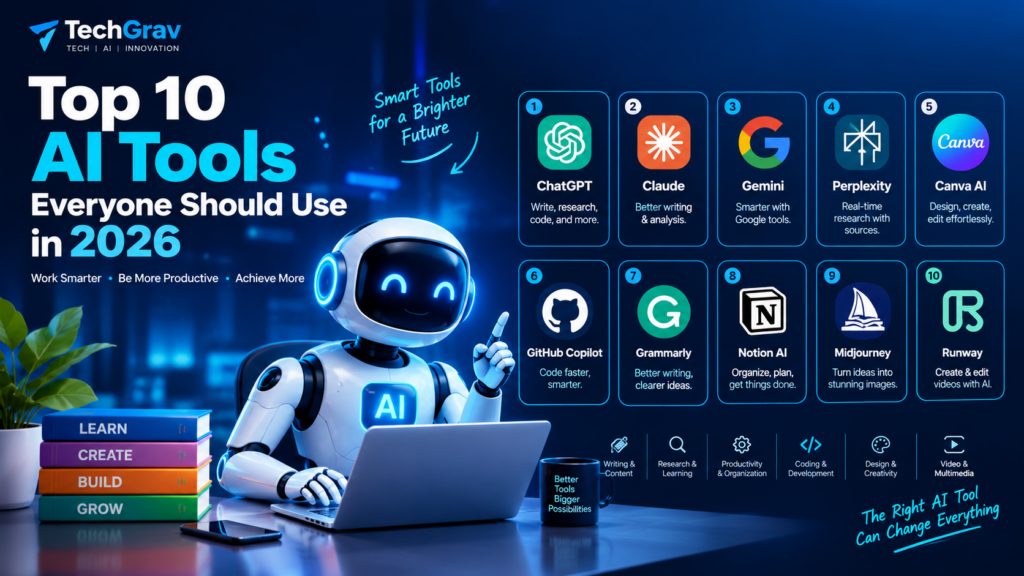
Table of Contents
Top 10 AI Tools in 2026 at a Glance
| AI Tool | Best For |
|---|---|
| ChatGPT | General-purpose AI assistance |
| Claude | Writing and complex analysis |
| Google Gemini | Google ecosystem productivity |
| Perplexity | Web research and source discovery |
| Canva AI | Graphic design and presentations |
| GitHub Copilot | Software development |
| Grammarly | Writing improvement |
| Notion AI | Notes and project organization |
| Midjourney | AI image generation |
| Runway | AI video creation and editing |
The tools below are selected for their usefulness across different workflows, rather than ranked by a single performance benchmark. Features and free-plan limits may change, so check each provider’s official website before subscribing.
1. ChatGPT — Best All-Round AI Tool
Best for: Writing, brainstorming, research, learning, coding, and everyday productivity.
ChatGPT is a versatile AI assistant that can help users with a wide range of personal and professional tasks. It can explain complex topics, generate ideas, summarize information, assist with coding, and help organize projects.
Key Features
- Generate and improve written content.
- Explain technical and educational concepts.
- Help with programming and debugging.
- Analyze supported documents and files.
- Assist with brainstorming and planning.
- Support image-related and other multimodal tasks, depending on available features.
Who Should Use ChatGPT?
Students can use ChatGPT to understand difficult subjects and prepare study materials. Bloggers can develop article outlines, marketers can brainstorm campaign ideas, and professionals can use it to draft emails and summarize information.
For technology websites such as TechGrav, ChatGPT can help generate article ideas, create content briefs, and improve readability.
Website: https://chatgpt.com/
2. Claude — Best for Writing and Complex Analysis
Best for: Long-form writing, document analysis, coding assistance, and structured reasoning.
Claude is an AI assistant developed by Anthropic. It is a useful option for people who work with lengthy documents, detailed instructions, and complex writing projects.
It can help organize ideas, summarize documents, review code, and transform rough notes into structured content.
Key Features
- Draft and edit long-form content.
- Summarize and analyze supported documents.
- Help with coding and debugging.
- Organize complex information.
- Assist with research and project-based workflows, depending on the plan.
Who Should Use Claude?
Writers, researchers, students, developers, and professionals who need detailed analysis may find Claude useful.
For example, a blogger could use it to turn research notes into a well-organized article draft and then fact-check the claims before publishing.
Website: https://claude.ai/
3. Google Gemini — Best for Google Ecosystem Productivity
Best for: Everyday assistance, learning, research, and workflows involving Google services.
Google Gemini is an AI assistant that helps users understand information, generate content, solve problems, and work with supported Google services.
Its integration with Google’s ecosystem can be particularly useful for people who already rely on products such as Gmail, Google Docs, and Google Drive. Specific integrations depend on the account, region, and subscription.
Key Features
- Generate ideas and written content.
- Explain concepts and answer questions.
- Help with research and summarization.
- Support coding and problem-solving.
- Assist with compatible Google applications.
- Work with supported image, audio, and other inputs.
Who Should Use Google Gemini?
Students, professionals, and business owners who use Google services regularly may benefit from Gemini.
It can help summarize information, draft messages, organize ideas, and support everyday tasks without requiring users to change their entire workflow.
Website: https://gemini.google.com/
4. Perplexity — Best AI Tool for Research
Best for: Web research, source discovery, current information, and fact-checking.
Perplexity is an AI-powered search and research tool that provides answers supported by links to sources. It can help users explore unfamiliar topics and identify relevant webpages more efficiently than manually searching through numerous results.
Key Features
- Search for information across the web.
- Present answers with source citations.
- Explore topics through follow-up questions.
- Compare information from multiple sources.
- Support research and information gathering.
Who Should Use Perplexity?
Students, journalists, bloggers, researchers, and professionals who need to find information quickly may find Perplexity helpful.
For example, a technology blogger can use it to discover sources for an article about AI developments.
However, citations do not guarantee that an answer is correct. Open the original sources, verify important claims, and prioritize reliable publications and official documentation.
Website: https://www.perplexity.ai/
5. Canva AI — Best for Graphic Design and Presentations
Best for: Social media posts, blog graphics, presentations, marketing materials, and visual content.
Canva is a popular design platform with AI-assisted features that help users create visual content without requiring advanced graphic design skills.
Its tools can support design generation, image editing, writing, presentations, and other creative workflows. Available features depend on the plan and product updates.
Key Features
- Create social media graphics.
- Design presentations and posters.
- Develop visual assets for blog articles.
- Edit and enhance images with supported AI features.
- Create branded marketing materials.
- Produce designs using templates and AI-assisted workflows.
Who Should Use Canva AI?
Content creators, small businesses, students, bloggers, and social media managers can use Canva to create attractive visual content.
For TechGrav, it can help produce featured images, Instagram posts, YouTube thumbnails, infographics, and presentation slides.
Website: https://www.canva.com/
6. GitHub Copilot — Best AI Tool for Coding
Best for: Software development, code completion, debugging, and programming assistance.
GitHub Copilot is an AI-powered coding assistant that helps developers write and understand code. It integrates with supported development environments and GitHub workflows.
It can suggest code, explain functions, assist with debugging, and support certain agent-based development tasks.
Key Features
- Suggest code while you type.
- Explain unfamiliar code.
- Help identify and fix programming errors.
- Generate tests and repetitive code.
- Assist with development workflows.
- Support coding tasks in compatible editors.
Who Should Use GitHub Copilot?
Software developers, computer science students, and programmers working on personal or professional projects can benefit from GitHub Copilot.
Beginners can use it to understand programming concepts, while experienced developers can use it to reduce repetitive work.
Generated code should always be reviewed, tested, and checked for security issues before being used in production.
Website: https://github.com/features/copilot
7. Grammarly — Best for Writing and Grammar
Best for: Grammar correction, proofreading, clarity, and professional communication.
Grammarly helps users improve written communication by identifying grammar issues, suggesting clearer wording, and supporting different writing styles.
Its AI features can also assist with rewriting and drafting, depending on the plan.
Key Features
- Identify grammar and spelling errors.
- Improve sentence clarity and readability.
- Suggest tone adjustments.
- Refine emails and professional documents.
- Assist with rewriting and drafting.
- Support writing across compatible applications.
Who Should Use Grammarly?
Students, bloggers, professionals, freelancers, and business owners can use Grammarly to improve the quality of their writing.
If you publish articles on TechGrav, Grammarly can help polish drafts before publication. It should complement—not replace—fact-checking, editorial judgment, and careful proofreading.
Website: https://www.grammarly.com/
8. Notion AI — Best for Notes and Project Management
Best for: Organizing notes, managing projects, summarizing documents, and coordinating work.
Notion combines note-taking, documentation, project management, and collaboration features. Its AI capabilities can help users organize information and work more efficiently within supported Notion workflows.
Key Features
- Summarize lengthy notes.
- Draft and improve documents.
- Organize project information.
- Help extract action items from notes.
- Support knowledge management.
- Assist with finding and working with information in connected workspaces, where available.
Who Should Use Notion AI?
Students, freelancers, content creators, startups, and teams that manage multiple projects may find Notion AI useful.
A blogger could use Notion to maintain an editorial calendar, organize keyword research, track article progress, and store content ideas in one workspace.
Review current plan details before subscribing because AI access and usage limits can vary.
Website: https://www.notion.com/
9. Midjourney — Best for AI Image Generation
Best for: Creative illustrations, concept art, stylized visuals, and image generation.
Midjourney is an AI image-generation platform that creates visuals from text prompts. It is particularly useful for exploring artistic styles, developing concepts, and creating distinctive imagery.
Key Features
- Generate images from text descriptions.
- Explore different artistic styles.
- Develop creative concepts and mood boards.
- Create visuals for storytelling and campaigns.
- Experiment with lighting, composition, and visual aesthetics.
Who Should Use Midjourney?
Designers, artists, marketers, content creators, and creative professionals can use Midjourney to explore visual ideas and develop artwork.
Technology bloggers can use AI-generated visuals for article concepts, provided they check licensing terms and clearly distinguish generated illustrations from real photographs when that distinction matters.
Website: https://www.midjourney.com/
10. Runway — Best for AI Video Creation
Best for: AI-assisted video generation, visual effects, and creative video workflows.
Runway is an AI-powered creative platform focused on video generation and editing. Its tools can help creators develop video concepts and produce visual content using supported generative features.
Key Features
- Generate video from supported text or image inputs.
- Explore creative video concepts.
- Assist with visual editing workflows.
- Create short promotional and social media clips.
- Experiment with AI-powered visual effects.
Who Should Use Runway?
Video creators, marketers, filmmakers, and social media managers can use Runway to explore new production workflows.
For example, a YouTube creator can develop short visual sequences for a technology explainer or promotional video. Review the output carefully for visual inconsistencies, and check the current plan limits and commercial-use terms before publishing.
Website: https://runwayml.com/
Why Should You Use AI Tools in 2026?
AI tools can support different parts of everyday work, from creating content to analyzing information.
1. Save Time
AI can assist with repetitive activities such as summarizing documents, organizing notes, and drafting routine communications.
2. Improve Productivity
Combining the right AI tools with a clear workflow can help users complete certain tasks more efficiently.
3. Boost Creativity
AI writing, design, and image-generation tools can help users explore ideas and develop creative concepts.
4. Support Learning
AI assistants can explain difficult concepts, generate practice questions, and help learners organize study materials.
5. Make Technology More Accessible
Many AI applications provide simple interfaces that allow users to perform useful tasks without extensive technical knowledge.
How to Choose the Best AI Tools for Your Needs
Not every AI tool is necessary for every user. Choose tools according to your goals, budget, and existing workflow.
Identify Your Main Goal
- Writing and research: ChatGPT, Claude, or Perplexity.
- Google-based productivity: Gemini.
- Graphic design: Canva AI.
- Coding: GitHub Copilot.
- Grammar and editing: Grammarly.
- Project organization: Notion AI.
- Image generation: Midjourney.
- Video creation: Runway.
Consider Free Plans and Pricing
Some tools offer free access with usage limits, while others require paid subscriptions for specific capabilities. Check current pricing and regional availability before committing.
Check Privacy and Security
Avoid entering passwords, confidential business documents, sensitive personal information, or proprietary code into AI tools unless their data-handling terms and your organization’s policies permit it.
Test Before You Commit
Try a few tools on real tasks and compare accuracy, ease of use, output quality, and cost. Keep the ones that genuinely improve your workflow.
Are Free AI Tools Enough in 2026?
Free AI tools can be sufficient for many everyday tasks, including basic writing assistance, brainstorming, learning, research, and simple design projects.
However, free plans may impose limits on usage, advanced models, file processing, image generation, or integrations.
If you are a beginner, start with free options where available. Consider a paid subscription only when you regularly encounter a limitation that affects your work.
Remember that a paid plan does not automatically guarantee more accurate results. Always check the quality of the output.
Conclusion: Which AI Tools Should You Start Using in 2026?
AI tools are changing how people write, research, design, learn, and develop software. The right applications can reduce repetitive work, support creativity, and help users manage their daily tasks more effectively.
For most beginners, ChatGPT is a practical starting point for general-purpose assistance. Perplexity is useful for source-backed research, Canva AI supports visual design, and GitHub Copilot can assist with programming. Other tools may be more suitable depending on your specific needs.
You do not need to use all ten tools. Start with one general-purpose AI assistant and add specialized applications as your needs grow.
The key to using AI successfully is choosing the right tool, verifying its output, and combining automation with human judgment.
Stay connected with TechGrav for more guides on AI tools, artificial intelligence, emerging technology, and digital productivity.
Frequently Asked Questions About AI Tools
1. What are the best AI tools to use in 2026?
Popular AI tools include ChatGPT for general assistance, Claude for writing and analysis, Gemini for Google-based workflows, Perplexity for research, Canva AI for design, and GitHub Copilot for coding. The best choice depends on your needs.
2. What are the best free AI tools in 2026?
Several tools offer free plans or limited free access, including ChatGPT, Gemini, Perplexity, Canva, and GitHub Copilot. Available features and usage limits can change, so check the official websites.
3. Which AI tool is best for students?
ChatGPT and Gemini can help students understand concepts and prepare study materials. Perplexity can support research, while Notion can help organize notes and assignments. Students should verify information and follow their institution’s AI policies.
4. Which AI tool is best for content creators?
ChatGPT or Claude can assist with writing, Canva AI can help create graphics, Midjourney can generate images, and Runway can support video creation.
5. Can AI tools replace human workers?
AI tools can automate some tasks and change how certain jobs are performed, but they do not reliably replace human judgment, accountability, creativity, and expertise in every situation.
6. Are AI tools safe to use?
AI tools can be useful, but users should check their privacy policies, avoid sharing sensitive information unnecessarily, and verify important outputs before acting on them.



Pingback: Best AI Automation Tools for Beginners in 2026: Top Tools to Save Time - Techgrav