
Software is an important part of almost every modern business. Companies use software to manage customers, employees, finances, sales, marketing, documents, communication, and daily operations.
However, businesses have different ways to get and use software.
Some companies use Software as a Service (SaaS) applications that are accessed through the internet. Others use traditional software, which is installed and maintained on company computers or servers.
Both approaches have advantages and disadvantages.
So, which one is better for a business?
The answer depends on the company’s size, budget, security requirements, technical resources, type of work, and long-term plans.
In this article, we will explain the difference between SaaS and traditional software, compare their costs, security, maintenance, scalability, accessibility, and other important factors.
Table of Contents
What is SaaS?
SaaS stands for Software as a Service.
With SaaS, the software is hosted by a service provider and accessed through the internet. Instead of installing and managing the complete software system on your own computer or server, you usually create an account and access the application through a web browser or app.
Common examples of SaaS include software for:
- Customer relationship management
- Project management
- Accounting
- Email marketing
- Customer support
- Team communication
- File storage
- Human resources
- Video meetings
- Business analytics
For example, instead of installing a project management application on a company server, a business can subscribe to an online project management service.
Employees can then log in and manage projects from supported devices.
How SaaS works?
The basic process is simple:
Business → Subscribes to SaaS → Provider hosts the software → Employees access it online
The SaaS provider usually manages the infrastructure, software updates, maintenance, and many security-related tasks.
The business mainly manages its users, settings, data, and how the software is used.
What is Traditional Software?
Traditional software is software that a business purchases or licenses and installs on its own computers or servers.
Depending on the software, the company may need to manage:
- Installation
- Servers
- Updates
- Backups
- Security
- Database systems
- Hardware
- User access
- Maintenance
For example, a company may install an application on its internal server and allow employees to access it through the company’s network.
Traditional software is sometimes called on-premises software when it is installed and operated on the organization’s own infrastructure.
How traditional software works?
The basic process is:
Business → Purchases or licenses software → Installs it → Manages infrastructure → Employees use it
The company has more control over the environment, but it also has more responsibility.
SaaS vs Traditional Software: Key Difference
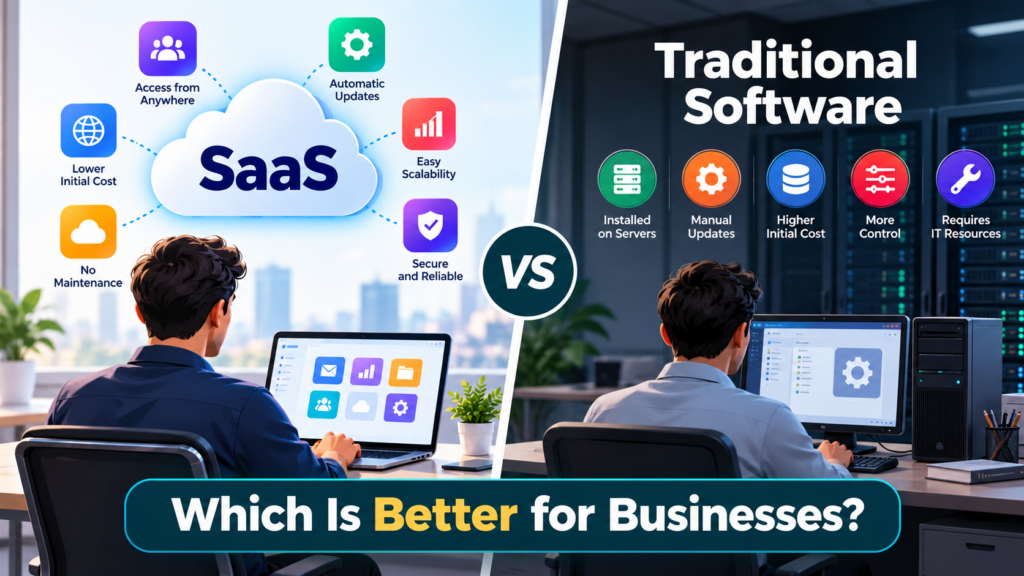
The biggest difference is where the software is hosted and who manages it.
| Factor | SaaS | Traditional Software |
|---|---|---|
| Hosting | Usually managed by provider | Usually managed by business |
| Access | Usually through internet | Often through local network or installed devices |
| Installation | Usually minimal | Usually required |
| Updates | Usually managed by provider | Usually managed by business |
| Maintenance | Mostly provider responsibility | Mostly business responsibility |
| Initial cost | Usually lower | Can be higher |
| Pricing | Often subscription-based | Often license or purchase-based |
| Scalability | Usually easier | May require additional infrastructure |
| Customization | Depends on provider | Often offers greater control |
| Infrastructure control | Lower | Higher |
| Remote access | Usually easier | May require additional setup |
Let’s look at these differences in more detail.
1. Cost
Cost is one of the first things businesses consider when choosing software.
SaaS costs
SaaS applications commonly use subscription pricing.
A business may pay:
- Monthly
- Annually
- Per user
- Based on usage
- Based on selected features
For example, a company may pay $20 per employee per month for a particular application.
This can make it easier for a small business to start using professional software without making a large upfront investment.
However, subscription costs continue over time.
A business that uses a SaaS product for many years may spend a significant amount on subscriptions.
Traditional software costs
Traditional software may require a larger initial investment.
The business may need to pay for:
- Software licenses
- Servers
- Hardware
- Installation
- IT support
- Security
- Backup systems
- Maintenance
The exact cost depends on the software and the organization’s infrastructure.
Which has lower cost?
There is no universal answer.
SaaS may have a lower initial cost, while traditional software may make sense for organizations that want long-term control over their infrastructure.
Businesses should calculate the total cost of ownership, not just the initial price.
2. Installation and Setup
SaaS usually requires less technical setup.
A company can normally create accounts, configure the application, and start using the service.
For example:
Create account → Add employees → Configure settings → Start working
Traditional software can require more work.
The company may need to:
- Purchase hardware.
- Install the software.
- Configure the server.
- Set up databases.
- Create user accounts.
- Configure security.
- Test the system.
- Train employees.
This can take more time, especially for large or complex applications.
3. Maintenance
Maintenance is another major difference.
With SaaS, the provider generally manages the application infrastructure and software maintenance.
This can include:
- Software updates
- Infrastructure maintenance
- Server management
- Bug fixes
- Security improvements
The exact responsibilities depend on the provider and service agreement.
With traditional software, the business usually has more responsibility.
The IT team may need to manage:
- Software updates
- Servers
- Operating systems
- Database maintenance
- Backups
- Security patches
- Hardware problems
This can require additional employees, skills, and resources.
4. Software Updates
SaaS applications are usually updated by the service provider.
Users generally do not need to manually install every update.
This can be convenient because employees can use newer versions without the company managing the entire update process.
Traditional software gives the business more control over updates.
The company can decide when to install a new version, depending on its software and license.
This can be useful when a business needs to test an update before deploying it.
However, delaying updates can also create maintenance and security challenges.
5. Accessibility
SaaS is designed for online access.
Employees can often access SaaS applications from different locations and devices, depending on the service.
This can be useful for:
- Remote teams
- Hybrid teams
- Employees who travel
- Multiple offices
- Distributed organizations
For example, a sales employee can access a cloud-based CRM while visiting a customer.
Traditional software may be designed primarily for local access.
Remote access can still be possible, but the business may need to configure additional systems such as VPNs, remote desktop services, or other secure access methods.
6. Scalability
Businesses can grow quickly.
A company may have 20 employees today and 200 employees in a few years.
SaaS can make scaling easier in many cases.
A business may be able to:
- Add users
- Upgrade plans
- Increase storage
- Enable additional features
The process can often be completed through the provider’s administration system.
Traditional software can also scale, but the company may need additional infrastructure.
For example, more employees may require:
- Additional hardware
- More server capacity
- Additional software licenses
- More storage
- More network capacity
This can make scaling more complex.
7. Customization
Customization is an area where traditional software can have an advantage.
A business running software on its own infrastructure may have more control over the system.
It may be able to modify:
- Software configurations
- Databases
- Integrations
- Internal workflows
- Infrastructure
However, customization depends heavily on the software’s architecture and licensing terms.
SaaS products may provide customization through:
- Settings
- Plugins
- APIs
- Integrations
- Custom workflows
- Extensions
But businesses generally cannot change the core application in whatever way they want.
Therefore, companies with highly specialized requirements should carefully check the customization options before selecting a SaaS product.
8. Security
Security is one of the most important considerations for any software.
SaaS providers generally manage many parts of the technical environment, including infrastructure security and system maintenance.
However, using a SaaS application does not automatically make a business secure.
The customer still needs to manage things such as:
- User passwords
- Multi-factor authentication
- User permissions
- Access policies
- Data sharing
- Employee accounts
For example, giving every employee administrator access can create unnecessary risk.
Traditional software gives businesses more control over their infrastructure.
However, more control also means more responsibility.
The company may need to manage:
- Firewalls
- Server security
- Software patches
- Network security
- Backups
- Access controls
- Monitoring
Therefore, neither SaaS nor traditional software is automatically secure.
Security depends on the provider, configuration, infrastructure, policies, and how the software is used.
9. Data Control
Data control can be an important factor for some organizations.
With SaaS, business data is generally stored in infrastructure controlled by the service provider.
Businesses should understand:
- Where data is stored
- How data is protected
- Who can access it
- How data is backed up
- How data can be exported
- What happens after cancellation
Traditional software can provide greater direct control because the organization manages its own infrastructure.
This can be important for businesses with specific data storage or operational requirements.
However, maintaining that infrastructure also requires technical resources.
10. Internet Dependency
SaaS applications generally depend on internet connectivity.
If the internet connection is unavailable, access to the SaaS service may be limited, depending on the product.
This can be a concern for businesses operating in locations with unreliable internet access.
Traditional software installed locally may continue working without an internet connection, depending on the application.
However, modern traditional applications can also depend on internet services for licensing, updates, cloud integrations, or other features.
Therefore, businesses should check the specific software requirements instead of assuming that one model always works offline.
11. Reliability and Downtime
With SaaS, the service provider is responsible for operating the platform.
A provider may have systems designed to keep the service available, but outages can still happen.
A business should review the provider’s:
- Service availability
- Backup process
- Disaster recovery
- Service-level agreement
- Incident response process
With traditional software, the organization has more control over its infrastructure.
But this also means the organization is responsible for keeping its systems available.
If a company server fails, the IT team may need to repair or replace it.
12. Backup and Recovery
Data loss can be a serious problem for any business.
SaaS providers may offer automated backups, but businesses should not assume that every provider offers the same level of protection.
Before choosing a SaaS application, check:
- Backup frequency
- Data recovery options
- Retention period
- Export options
- Disaster recovery procedures
Traditional software allows businesses to design their own backup systems.
For example, a company can maintain:
Primary server → Local backup → Off-site backup
This provides greater control, but the company must manage the process correctly.
13. Vendor Lock-In
Vendor lock-in occurs when it becomes difficult or expensive to move from one software provider to another.
This can happen with both SaaS and traditional software.
However, SaaS customers should pay particular attention to data portability because important business information may be stored inside the provider’s platform.
Before selecting a SaaS product, ask:
- Can we export our data?
- What format is the exported data in?
- Is there an API?
- Can we migrate the data to another system?
- What happens when we cancel?
- Are there additional export charges?
These questions can reduce problems in the future.
14. Support
SaaS providers generally offer support through channels such as:
- Chat
- Help centers
- Documentation
- Phone support
- Dedicated account managers
The level of support depends on the provider and plan.
Traditional software support can come from:
- Internal IT teams
- Software vendors
- Consultants
- Third-party support companies
A business with a strong internal IT department may be comfortable managing traditional software.
A smaller company may prefer a SaaS product where much of the technical work is handled by the provider.
15. SaaS Is Often Easier for Small Businesses
Small businesses usually have limited budgets and IT resources.
SaaS can be attractive because the company does not need to build a large software infrastructure before getting started.
For example, a small business can use SaaS applications for:
- Accounting
- Customer management
- Email marketing
- Project management
- File storage
- Communication
The company can start with a small number of users and expand as it grows.
This can reduce the amount of technical work required to get started.
16. Traditional Software Can Make Sense for Specialized Businesses
Traditional software can still be useful.
Some organizations have specific requirements that are difficult to meet with standard SaaS products.
For example, a business may need:
- Full infrastructure control
- Deep customization
- Specific data storage requirements
- Integration with legacy systems
- Operation in an isolated environment
- Control over software versions
In these situations, traditional software may be considered because the organization has more control over the environment.
Can Businesses Use Both SaaS and Traditional Software?
Yes.
A business does not always have to choose only one model.
Many organizations can use a combination of different technologies.
For example:
Traditional software can be used for a specialized internal system.
SaaS can be used for:
- Customer support
- Project management
- Marketing
- Collaboration
- Accounting
This approach can allow businesses to use SaaS where it is convenient while keeping specialized systems under greater internal control.
The right combination depends on the organization’s requirements.
The Future of Business Software
The difference between SaaS vs Traditional Software is becoming less simple.
Modern SaaS applications can provide powerful customization, APIs, automation, integrations, analytics, and artificial intelligence.
At the same time, traditional software can connect to cloud services and other online systems.
Businesses are therefore increasingly choosing software based on specific requirements rather than simply asking whether it is cloud-based or installed locally.
The most important factors are becoming:
- Business value
- Security
- Integration
- Scalability
- Data control
- Cost
- User experience
- Reliability
- Flexibility
Conclusion
SaaS vs Traditional Software both have a place in business technology.
SaaS can provide a simple way to access modern software without managing the complete infrastructure. It can be particularly useful for businesses that want quick deployment, remote access, easier scaling, and lower infrastructure management.
Traditional software can provide greater control and customization. It can be useful for organizations with specialized requirements, strong IT teams, or specific infrastructure and data needs.
The right choice is not about choosing the newer technology.
It is about choosing the technology that fits the business.
Before making a decision, compare the total cost, security, maintenance, scalability, customization, data control, integrations, and long-term requirements.
For many businesses, the answer may also be a combination of SaaS vs Traditional Software rather than choosing only one.



Pingback: Top SaaS HR Software for Employee Management in 2026 - Techgrav
Pingback: Top SaaS Tools to Improve Business Productivity in 2026 - Techgrav