Managing employees efficiently is essential for every growing business. From maintaining employee records and tracking attendance to processing payroll and monitoring performance, HR teams handle many important responsibilities. Managing these tasks manually can consume valuable time, increase paperwork, and lead to errors.
This is where SaaS HR software for employee management can make a difference. SaaS, or Software as a Service, allows businesses to access HR tools through the internet without installing and maintaining complex SaaS software on their own servers.
Modern HR platforms help businesses automate routine tasks, organize employee information, manage leave requests, streamline recruitment, and improve communication between employees and HR teams.
In this guide, we explore some of the top SaaS HR software solutions for employee management in 2026, their key features, and how to choose the right platform for your organization.
Table of Contents
What Is SaaS HR Software?
SaaS HR software is a cloud-based platform designed to manage human resources activities from a centralized system. Instead of storing employee information across spreadsheets and separate applications, businesses can use one platform to organize important HR processes.
Depending on the product and plan, these platforms may include:
- Employee information and document management
- Attendance and time tracking
- Leave and holiday management
- Payroll and benefits administration
- Recruitment and applicant tracking
- Employee onboarding and offboarding
- Performance reviews and goal tracking
- HR reporting and workforce analytics
- Employee self-service portals
Because the software is hosted online, authorized users can generally access it from different locations and devices. This makes SaaS HR solutions particularly useful for small businesses, growing companies, and organizations with distributed teams.
Top SaaS HR Software for Employee Management in 2026
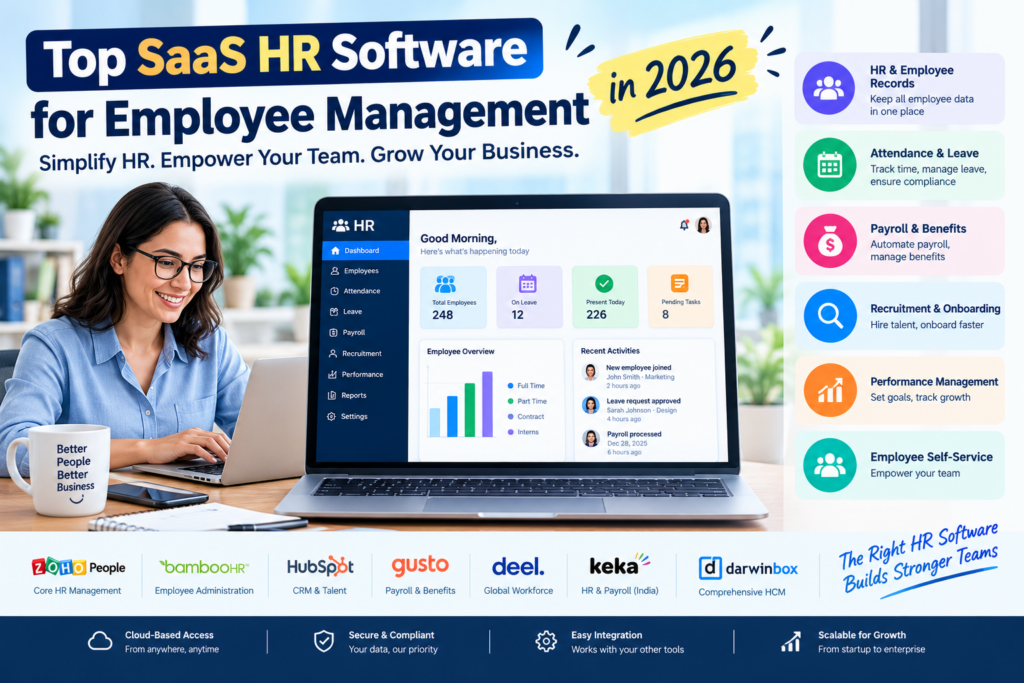
The best HR platform depends on your company size, location, budget, and workforce needs. The following solutions serve different types of businesses, from small teams seeking simple HR tools to larger organizations requiring comprehensive workforce management.
1. Zoho People
Best for: Small and medium-sized businesses
Zoho People is a cloud-based HR management platform that helps businesses organize employee information and automate everyday HR activities.
Its features can help HR teams manage employee records, track attendance, administer leave, coordinate onboarding, and conduct performance reviews.
Key features:
- Centralized employee database
- Attendance and time tracking
- Leave management and approval workflows
- Employee self-service
- Performance management
- HR reports and analytics
Why choose Zoho People?
Zoho People is worth considering for businesses that want to move away from spreadsheets and bring essential HR processes into one system. It can also be an attractive option for companies already using other products in the Zoho ecosystem.
2. BambooHR
Best for: Growing businesses that need user-friendly HR management
BambooHR is an HR software platform focused on helping organizations manage employee information throughout the employment lifecycle.
It brings employee records, hiring workflows, onboarding, and other HR activities together in a centralized environment.
Key features:
- Employee records and organizational charts
- Applicant tracking and hiring workflows
- Employee onboarding and offboarding
- Time-off management
- Performance management
- HR reporting
Why choose BambooHR?
BambooHR is a strong candidate for businesses that want an approachable HR system without building a complicated collection of separate tools. Availability of payroll and other features depends on the product offering and country, so international businesses should check local support before choosing a plan.
3. Rippling
Best for: Businesses that want to connect HR and IT management
Rippling combines HR workflows with capabilities for managing employee-related technology and business applications. Depending on the modules selected, companies can coordinate onboarding, payroll, benefits, app access, and device management.
Key features:
- Employee data management
- Employee onboarding and offboarding workflows
- Payroll and benefits administration
- Time and attendance tools
- Application and device management
- Workflow automation and reporting
Why choose Rippling?
Rippling can be useful for organizations that want HR and IT processes to work together. For example, a new employee’s onboarding workflow may coordinate HR tasks with access to approved business applications.
However, the platform’s modules, pricing, and availability vary. Businesses should confirm that the required services are supported in their country.
4. Gusto
Best for: Small businesses looking for payroll-focused HR tools
Gusto focuses on payroll and related employee administration, with additional HR capabilities depending on the plan and location.
It can help eligible businesses manage employee payments, tax-related payroll processes, benefits, and certain onboarding tasks.
Key features:
- Payroll processing
- Payroll tax administration
- Employee onboarding
- Benefits administration
- Time tracking integrations and tools
- Employee payment information
Why choose Gusto?
Gusto is worth evaluating if payroll is one of your company’s biggest administrative challenges. Its suitability depends heavily on where your business operates because payroll, tax, and benefits services are country-specific.
Businesses outside its supported markets should consider a provider designed for their local payroll and compliance requirements.
5. Deel
Best for: Businesses employing international or distributed teams
Deel provides tools for managing global teams, including international hiring, contractor administration, and employment services in supported countries.
It can help organizations coordinate employee information, contracts, onboarding, and payments across different markets.
Key features:
- International employee and contractor management
- Digital contracts and onboarding
- Global payroll services in supported markets
- Workforce administration
- Document management
- Compliance-related workflows
Why choose Deel?
Deel may be a good option for businesses that hire people across national borders and need a more centralized way to manage their workforce.
International employment rules can be complex, so businesses should verify the services, legal arrangements, and compliance coverage available for each country where they employ workers.
6. Keka
Best for: Indian businesses seeking integrated HR and payroll management
Keka is an HR and payroll platform commonly considered by Indian organizations looking to streamline employee administration.
Its capabilities can help businesses manage employee records, attendance, leave, payroll workflows, recruitment, and performance processes.
Key features:
- Employee database and HR records
- Attendance and shift management
- Leave and holiday management
- Payroll processing
- Recruitment and onboarding
- Performance management and reporting
Why choose Keka?
Keka is worth evaluating for businesses in India that want HR and payroll workflows in one platform. Before subscribing, confirm that its available modules match your payroll structure, attendance policies, reporting requirements, and applicable Indian compliance obligations.
7. Darwinbox
Best for: Mid-sized and large organizations
Darwinbox offers a broader human capital management platform designed to support multiple stages of the employee lifecycle.
Depending on implementation and modules, it can help organizations coordinate recruitment, onboarding, employee information, performance, and workforce administration.
Key features:
- Core HR and employee records
- Recruitment and onboarding
- Leave and attendance management
- Performance and talent management
- Employee engagement tools
- HR analytics and reporting
Why choose Darwinbox?
Darwinbox may suit organizations that need a more comprehensive HR platform with processes that can support a larger workforce. Businesses should assess implementation needs, integrations, employee experience, and total cost before making a decision.
8. Workday HCM
Best for: Large enterprises with complex HR requirements
Workday Human Capital Management is an enterprise-oriented platform that supports HR, talent, workforce, and organizational management.
It is designed for businesses that need to manage complex employee structures and integrate HR information with broader planning and reporting processes.
Key features:
- Core HR and workforce management
- Talent acquisition and employee development
- Performance and compensation management
- Workforce planning and analytics
- Employee self-service
- Enterprise reporting capabilities
Why choose Workday HCM?
Workday is worth considering for large organizations that need comprehensive HR capabilities across departments, business units, or regions. Its implementation and ongoing costs may make it less suitable for small businesses with straightforward HR needs.
9. HiBob
Best for Growing companies focused on employee experience
HiBob, often known as Bob, is an HR platform designed to support employee management, workforce processes, and company culture.
It helps HR teams organize employee information while supporting onboarding, performance, and engagement-related workflows.
Key features:
- Centralized employee records
- Employee onboarding
- Time-off and attendance-related workflows
- Performance management
- Employee engagement tools
- HR analytics and reporting
Why choose HiBob?
HiBob can be a suitable choice for growing and distributed organizations that want to combine core HR administration with employee experience and engagement tools. Companies should verify which features and integrations are included in their proposed package.
10. Connecteam
Best for Businesses with deskless and frontline employees
Connecteam is designed to help businesses coordinate employees who work in the field, at customer locations, in stores, or across shift-based operations.
Its workforce tools can support scheduling, communication, time tracking, and everyday employee coordination.
Key features:
- Employee scheduling
- Time clock and timesheet tools
- Team communication
- Task and checklist management
- Employee information and training tools
- Workforce coordination
Why choose Connecteam?
Connecteam may be especially useful for businesses whose employees do not work at desks all day. Retailers, hospitality businesses, service companies, and field teams may benefit from its mobile-first approach.
Businesses should check which HR, payroll, and workforce features are available in their selected plan and region.
Comparison of the Top SaaS HR Software
| Software | Best For | Main Strength |
|---|---|---|
| Zoho People | Small and medium-sized businesses | Core HR management |
| BambooHR | Growing businesses | User-friendly employee administration |
| Rippling | HR and IT coordination | Connected workflows |
| Gusto | Eligible small businesses | Payroll-focused HR |
| Deel | International teams | Global workforce administration |
| Keka | Indian businesses | HR and payroll workflows |
| Darwinbox | Mid-sized and large organizations | Comprehensive HCM |
| Workday HCM | Large enterprises | Enterprise HR management |
| HiBob | Growing, distributed companies | Employee experience and HR |
| Connecteam | Frontline and deskless teams | Scheduling and workforce coordination |
Note: This comparison summarizes general product positioning. Exact features, integrations, prices, and regional availability depend on the provider, package, and implementation.
Key Features to Look for in SaaS HR Software
Before selecting an HR platform, identify the capabilities that will solve your organization’s most important problems.
1. Employee Database Management
A centralized employee database helps HR teams maintain contact information, job details, employment documents, reporting structures, and other records in one place.
Look for permission controls that restrict access to sensitive information.
2. Attendance and Leave Management
Attendance tools can help businesses record working hours, manage shifts, and review timesheets. Leave management features allow employees to submit requests and managers to approve them according to company policies.
For organizations with shift-based teams, verify that scheduling rules and attendance devices or integrations are supported.
3. Payroll and Benefits Administration
Payroll features can reduce repetitive calculations and help organize salary payments, deductions, payslips, and payroll reports.
However, payroll rules differ between countries and regions. Confirm that the software supports your location’s tax rules, statutory deductions, benefits, and reporting obligations before relying on it for payroll processing.
4. Recruitment and Onboarding
Recruitment tools help HR teams manage applications, coordinate interviews, and track candidates. Onboarding workflows help new employees complete documents, review policies, and receive the information needed to begin their roles.
Automated workflows can reduce repetitive administrative work and create a more consistent onboarding experience.
5. Performance Management
Performance management tools can help organizations establish goals, schedule reviews, collect feedback, and document employee development.
Choose a platform that fits your review process rather than paying for complicated features your organization will rarely use.
6. Employee Self-Service
An employee self-service portal lets employees access permitted information and complete routine tasks, such as updating contact details, viewing payslips, or requesting leave.
This can reduce the number of basic administrative requests sent to HR teams.
7. Reporting and Analytics
HR reporting helps businesses understand workforce trends, including headcount, absenteeism, turnover, and recruitment progress.
Look for reports that support actual business decisions and can be exported or integrated with other systems when necessary.
8. Security and Compliance
HR systems contain sensitive employee information. Before choosing a provider, review its security controls, access permissions, encryption practices, data retention policies, backup arrangements, and available compliance documentation.
Organizations should also check applicable privacy and employment requirements in the regions where they operate.
Benefits of Using SaaS HR Software
Saves Time Through Automation
Automating routine processes such as leave approvals, onboarding tasks, and employee data updates helps HR teams spend less time on repetitive administration.
Improves Data Accuracy
A centralized system can reduce duplicate records and errors caused by manually maintaining multiple spreadsheets. Accuracy still depends on good data practices and appropriate system configuration.
Supports Remote and Distributed Teams
Cloud-based platforms allow authorized employees and managers to access HR information from different locations, subject to the provider’s access controls and availability.
Improves Employee Experience
Self-service tools, clear approval workflows, and timely access to relevant information can make everyday HR processes easier for employees.
Supports Business Growth
As a company expands, it may need more sophisticated hiring, reporting, payroll, and performance processes. A scalable platform can help accommodate these changes without rebuilding every workflow from scratch.
Helps Standardize HR Processes
A centralized platform can make it easier to apply consistent policies and approval processes across teams and locations.
How to Choose the Best SaaS HR Software for Your Business
Choosing HR software should start with your business requirements, not with the longest feature list.
Step 1: Identify your HR challenges. Determine whether your biggest problems involve payroll, attendance, recruitment, employee records, performance reviews, or several of these areas.
Step 2: Consider your company size. A small business may need only core HR and leave management, while a larger company may require advanced reporting, integrations, and multi-location support.
Step 3: Check regional compatibility. Confirm that payroll, statutory reporting, language options, and local employment requirements are supported wherever your employees work.
Step 4: Compare total costs. Review subscription charges, per-employee fees, implementation, migration, add-on modules, training, and support costs. Ask providers for a quote based on your expected workforce size.
Step 5: Review integrations. Check whether the platform connects with your accounting software, identity provider, collaboration tools, attendance systems, and other important business applications.
Step 6: Test the user experience. Use a demo or trial, if available, to assess how easily employees and managers can complete common tasks.
Step 7: Evaluate security and support. Review access controls, data protection practices, support availability, and the provider’s process for handling service disruptions.
Step 8: Plan implementation. Decide who will manage setup, migrate employee data, configure policies, train users, and monitor adoption after launch.
SaaS HR Software for Indian Businesses
For companies operating in India, HR software selection involves more than employee records and leave tracking. Payroll processes and compliance requirements can vary according to employee categories, locations, and applicable laws.
When evaluating platforms such as Keka, Zoho People, or Darwinbox, consider the following:
- Support for Indian payroll structures and salary components
- Relevant statutory deductions and payroll reporting
- Attendance, shift, and leave policies
- Employee document management
- Integration with accounting and finance systems
- Data access controls and privacy practices
- Support for multiple offices, branches, or legal entities
Do not assume that every HR product or subscription includes all local compliance capabilities. Confirm the details with the provider and consult a qualified professional where necessary.
Frequently Asked Questions (FAQs)
What is the best SaaS HR software for small businesses?
The best choice depends on your priorities. Zoho People may suit businesses looking for core HR management, while Keka is worth evaluating for Indian businesses seeking HR and payroll workflows. BambooHR may appeal to growing companies that value user-friendly employee administration. Compare current features, pricing, and regional availability before deciding.
Is SaaS HR software suitable for startups?
Yes. SaaS HR software can help startups organize employee records, manage leave, standardize onboarding, and reduce manual administration. Startups should choose a plan that meets current needs while allowing room to grow.
Can SaaS HR software manage payroll?
Some platforms offer built-in payroll, while others rely on integrations or separate modules. Payroll support varies by provider and country, so confirm that the product supports your business’s specific payroll requirements.
Is cloud-based HR software secure?
Cloud-based HR software can provide security controls such as encryption, role-based permissions, backups, and authentication features. However, security varies between providers and configurations. Businesses should review the vendor’s security documentation and apply appropriate access policies.
What is the difference between HRMS and HRIS?
HRIS generally refers to a human resources information system focused on employee data and core HR administration. HRMS often describes a broader human resources management system that may include additional functions such as payroll, attendance, recruitment, and performance management. Vendors do not always use these terms consistently, so compare actual features rather than relying only on labels.
How much does SaaS HR software cost?
Pricing varies by provider, employee count, selected modules, billing arrangement, and region. Some products offer entry-level plans, while enterprise platforms may require customized pricing. Request a current quote and calculate the total cost, including setup, support, and optional modules.
Conclusion
SaaS HR software can help businesses manage employees more efficiently by bringing important HR activities into a centralized cloud-based platform. From employee records and attendance to recruitment, payroll, and performance management, the right system can reduce repetitive work and support more consistent processes.
For small and medium-sized businesses, Zoho People, BambooHR, and Keka are useful platforms to evaluate based on your location and requirements. Businesses with international teams may consider Deel, while organizations with more complex enterprise needs may explore Darwinbox or Workday HCM. Companies with frontline employees may find Connecteam’s scheduling and communication capabilities particularly relevant.
Ultimately, the best SaaS HR software is the one that fits your workforce, supports your local requirements, protects employee information, and offers good value as your business grows. Compare product capabilities, test the user experience, and confirm current pricing before making your final decision.