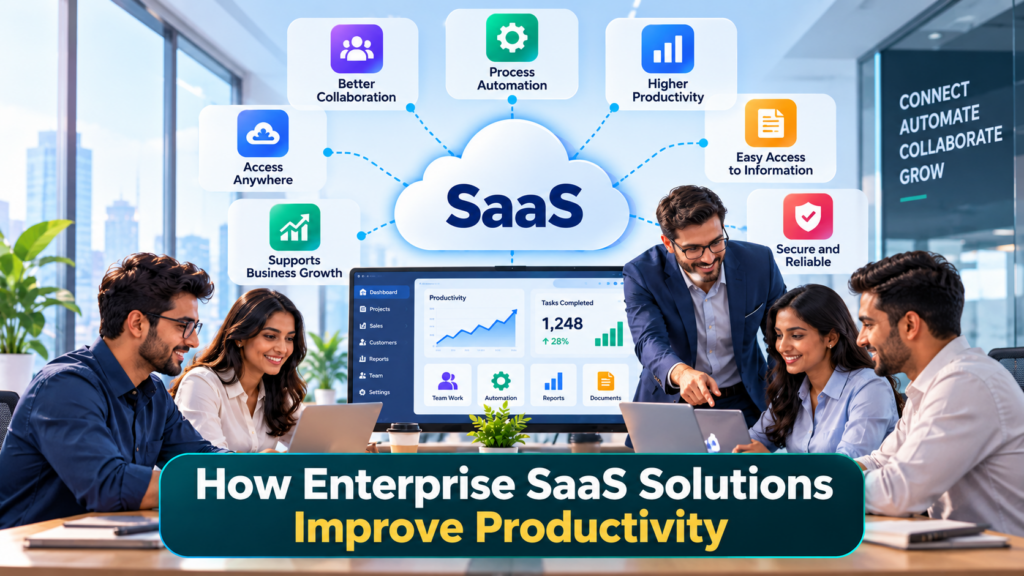

Businesses today use software for almost every part of their daily work. Employees use software to communicate, manage customers, create reports, handle finances, track projects, store documents, and complete many other tasks.
For large organizations, managing all these activities can become difficult. Different teams may use different systems, employees may work from different locations, and large amounts of business data may need to move between applications.
This is where Enterprise SaaS solutions can help.
Enterprise SaaS, or Software as a Service for enterprises, provides business applications through the internet. Instead of installing and managing every application on company-owned servers, organizations can use software hosted and maintained by a SaaS provider.
Enterprise SaaS solutions can improve productivity by making software easier to access, reducing repetitive work, improving collaboration, automating business processes, and helping employees find information faster.
The goal is not simply to use more software. The goal is to use software that helps employees spend less time on routine work and more time on important business activities.
Table of Contents
What is Enterprise SaaS?
Enterprise SaaS refers to cloud-based software designed to meet the needs of large organizations.
These solutions can support different business functions, including:
- Customer relationship management
- Human resources
- Accounting and finance
- Project management
- Marketing
- Sales
- Customer support
- Communication
- Data analytics
- Document management
- Cybersecurity
- Enterprise resource planning
Employees generally access these applications through a web browser or dedicated application.
The SaaS provider manages much of the underlying infrastructure, while the organization manages users, permissions, configurations, business processes, and data according to the service.
For example, a large company may use an enterprise CRM platform to store customer information. Sales employees can access customer records, update opportunities, review previous interactions, and collaborate with other teams without maintaining the CRM infrastructure themselves.
Why Productivity Matters in Large Organizations
Productivity is not only about making employees work faster.
It also means reducing unnecessary work and helping employees use their time effectively.
A large organization may lose significant amounts of time because employees have to:
- Search for information
- Enter the same data into multiple systems
- Wait for approvals
- Send repeated emails
- Create reports manually
- Coordinate tasks between departments
- Fix errors caused by manual processes
- Switch between disconnected applications
Even a small amount of wasted time can become significant when thousands of employees are involved.
Enterprise SaaS solutions can help reduce these problems by bringing information, workflows, automation, and collaboration into connected digital systems.
How Enterprise SaaS Solutions Improve Productivity?
1. Easy Access to Business Applications
One of the main benefits of enterprise SaaS is easy access.
Employees can access supported applications through the internet from approved devices and locations.
This is particularly useful for organizations with:
- Multiple offices
- Remote employees
- Hybrid teams
- International operations
- Employees who travel frequently
For example, a sales employee visiting a customer can access the company’s CRM to check customer information without returning to the office.
Similarly, a manager working from home can review a project dashboard and approve a task.
This makes business applications available when employees need them.
2. Faster Collaboration Between Teams
Large organizations often have multiple teams working on the same project.
For example, a product launch may involve:
- Marketing
- Sales
- Product development
- Finance
- Customer support
- Management
If every team works with separate information, communication can become difficult.
Enterprise SaaS Solutions can provide shared workspaces where authorized employees can access the same information.
For example, a project management platform can show:
- Tasks
- Deadlines
- Assigned employees
- Project status
- Documents
- Comments
- Progress reports
Employees do not need to depend entirely on long email conversations to understand what is happening.
3. Reducing Repetitive Manual Work
Repetitive tasks can consume a large amount of employee time.
Consider a simple process where a new customer signs up.
Without automation, an employee may need to:
- Enter the customer’s information.
- Create a CRM record.
- Send a welcome email.
- Notify the sales team.
- Create a follow-up task.
- Add the customer to a marketing list.
Enterprise SaaS platforms can automate many of these steps.
A workflow could be:
New customer → Create CRM record → Send email → Notify sales → Create follow-up task
The employee does not need to perform every step manually.
This allows employees to focus on activities that require human judgment.
4. Automating Approval Workflows
Many organizations have approval processes.
Employees may need approval for:
- Expenses
- Leave requests
- Purchase orders
- Contracts
- Discounts
- Marketing campaigns
- New software
- Business documents
Traditional approval processes may involve emails, spreadsheets, and manual follow-ups.
Enterprise SaaS can turn these processes into digital workflows.
For example:
Employee submits expense → Manager receives notification → Manager approves → Finance processes payment
The system can record each step and notify the appropriate person.
This can reduce delays and make the process easier to track.
5. Faster Access to Information
Employees cannot be productive if they spend too much time looking for information.
Large organizations often have information spread across:
- Documents
- Spreadsheets
- CRM systems
- Project management tools
- Internal databases
- Communication platforms
Enterprise SaaS solutions can centralize important information or connect different systems.
For example, a customer support employee can view a customer’s account details, previous support requests, and subscription information from one workspace.
This means the employee spends less time searching for information and more time helping the customer.
6. Better Document Management
Documents are an important part of business operations.
Employees may create and manage:
- Contracts
- Reports
- Presentations
- Proposals
- Policies
- Product documents
- Financial documents
Enterprise SaaS Solutions document management platforms can help teams store, organize, share, and collaborate on documents.
Employees can also use permissions to control who can access specific information.
Instead of searching through different folders and email attachments, employees can work from a shared document system.
7. Real-Time Collaboration on Documents
Traditional document workflows can create multiple versions of the same file.
For example:
Report-final.docx
Report-final-new.docx
Report-final-updated.docx
Report-final-latest.docx
This can cause confusion.
Cloud-based SaaS collaboration tools allow multiple authorized employees to work with the same document.
Teams can:
- Edit documents
- Add comments
- Review changes
- Share files
- Track versions
- Assign tasks
This can reduce confusion and make collaboration easier.
8. Improving Communication
Communication is essential in large organizations.
Employees may need to communicate across different departments, offices, and countries.
Enterprise SaaS communication platforms can provide features such as:
- Team messaging
- Video meetings
- Voice calls
- File sharing
- Group discussions
- Meeting recordings
- Notifications
These tools can reduce dependence on long email threads for everyday communication.
Employees can also create separate channels or workspaces for different projects and teams.
9. AI-Powered Productivity
Artificial intelligence is becoming an important part of enterprise SaaS.
Modern SaaS applications can use AI to help employees complete everyday tasks.
For example, AI can help with:
- Writing emails
- Summarizing meetings
- Creating reports
- Analyzing data
- Finding information
- Preparing presentations
- Summarizing documents
- Answering common questions
- Suggesting next actions
Imagine a manager attends a one-hour meeting.
Instead of manually writing notes, an AI feature can create a summary and identify important action items.
The manager can then review the output and share it with the team.
This can reduce administrative work.
10. AI Assistants Can Help Employees Find Information
Large organizations can have thousands of documents and records.
Employees may know that information exists but may not know where to find it.
AI-powered enterprise search can allow employees to ask questions using natural language.
For example:
“What was the reason for the change in our pricing policy?”
Instead of searching through dozens of documents manually, an AI-powered system may identify relevant information from approved company sources.
The employee should still verify important information, especially when the decision involves financial, legal, security, or other sensitive matters.
11. AI Agents Can Handle Multi-Step Tasks
Enterprise SaaS Solutions is also moving beyond simple AI assistants.
AI agents can be designed to perform multiple steps in a workflow.
For example, a sales agent could:
- Review a new customer inquiry.
- Check the customer’s CRM record.
- Summarize previous conversations.
- Identify the customer’s requirements.
- Prepare a draft response.
- Create a follow-up task.
- Update the CRM.
The employee can review the work before important actions are completed.
This type of automation can reduce the amount of repetitive administrative work handled by employees.
12. Better Project Management
Large projects can involve hundreds of tasks and many employees.
Without a centralized system, it can be difficult to know:
- Who is responsible for a task?
- What has been completed?
- What is delayed?
- What needs approval?
- What is the next step?
Enterprise project management SaaS platforms can provide a central location for this information.
Managers can view project dashboards, deadlines, task ownership, and progress.
Employees can also receive notifications about tasks assigned to them.
This creates greater visibility across the organization.
13. Improving Sales Productivity
Sales teams spend time on many activities besides talking to customers.
They may need to:
- Update CRM records
- Write emails
- Prepare reports
- Schedule meetings
- Track leads
- Follow up with customers
- Prepare sales forecasts
Enterprise SaaS CRM systems can automate many of these tasks.
For example, when a salesperson completes a customer call, the system can record the activity and create a reminder for the next follow-up.
AI can also summarize customer conversations and identify important information.
This allows sales employees to spend more time communicating with customers.
14. Improving Customer Support Productivity
Customer support teams handle a large number of requests every day.
Enterprise SaaS support platforms can organize these requests into tickets.
The system can automatically:
- Assign tickets
- Categorize requests
- Set priorities
- Send notifications
- Track response times
- Create reports
AI can also help answer common customer questions.
For example, if a customer asks how to reset a password, an AI assistant can provide the standard instructions.
More complex issues can be transferred to human support employees.
This allows support teams to focus their time on problems that require human attention.
15. Making HR Processes Faster
Human resources departments manage many repetitive processes.
These include:
- Employee onboarding
- Leave requests
- Employee records
- Payroll information
- Performance reviews
- Training
- Recruitment
Enterprise HR SaaS platforms can bring many of these processes into one system.
For example, when a new employee joins the company, the system can create onboarding tasks for HR, IT, and the employee’s manager.
This creates a structured process instead of relying on separate emails and spreadsheets.
16. Improving Employee Onboarding
Employee onboarding can involve many steps.
A new employee may need:
- An email account
- Software access
- Security training
- Company documents
- Equipment
- Team introductions
- Job-specific training
Enterprise SaaS workflows can automate parts of this process.
For example:
New employee added → Create accounts → Assign training → Send documents → Notify manager
This can reduce the administrative workload for HR and IT teams.
17. Better Financial Workflows
Finance teams deal with many processes that require accuracy and approvals.
Enterprise SaaS financial systems can help manage:
- Invoices
- Expenses
- Purchase orders
- Budgets
- Payments
- Financial reports
Automation can reduce manual data entry.
For example, an invoice can automatically enter a review workflow after it is received.
The relevant manager can receive a notification and approve it without waiting for a manual email request.
18. Connecting Different Business Systems
A large company may use many SaaS applications.
For example:
CRM + Accounting + HR + Marketing + Customer Support + Analytics
If these systems do not communicate with each other, employees may need to enter the same information multiple times.
Integrations and APIs can connect these systems.
For example, when a new customer is created in the CRM, the information can be automatically shared with the billing system.
This reduces duplicate data entry.
19. Reducing Duplicate Data Entry
Entering the same information into multiple systems is inefficient and can create errors.
Suppose an employee enters a customer’s address into three different applications.
If the address changes, the employee may need to update all three systems.
Connected SaaS applications can reduce this problem by sharing information automatically.
This can improve both productivity and data consistency.
20. Better Business Reporting
Managers need accurate information to understand business performance.
Enterprise SaaS analytics platforms can collect information from different systems and display it through dashboards.
A business dashboard might show:
- Sales
- Revenue
- Customer growth
- Support requests
- Employee performance
- Marketing results
- Project progress
Instead of manually collecting information from multiple spreadsheets, managers can access dashboards and reports from a central system.
21. Faster Decision-Making
Good decisions require good information.
When information is scattered across different systems, managers may spend a lot of time collecting and preparing data.
Enterprise SaaS platforms can provide dashboards and automated reports that make important information easier to access.
For example, a sales manager can check current sales activity without waiting for an employee to prepare a spreadsheet.
This can shorten the time between identifying a problem and taking action.
22. Supporting Remote and Hybrid Employees
Large organizations may have employees working from different locations.
Enterprise SaaS applications can support this model by providing online access to business tools.
Employees can:
- Join meetings
- Access documents
- Manage projects
- Update CRM records
- Communicate with teams
- Review dashboards
This allows employees to continue working even when they are not in the same office.
23. Centralized User and Access Management
Large organizations may have thousands of employees.
Managing access manually can become difficult.
Enterprise SaaS solutions can integrate with identity and access management systems.
Administrators can control:
- Who can access an application
- Which features they can use
- What data they can see
- Whether additional authentication is required
When an employee changes departments, their access can also be adjusted.
When an employee leaves the company, access can be removed as part of the offboarding process.
This creates a more organized approach to software access.
24. Reducing Software Maintenance Work
Traditional business software may require organizations to manage servers, installations, patches, and updates.
With SaaS, much of the underlying infrastructure is managed by the provider.
This can reduce the workload for internal IT teams.
IT employees can spend more time on activities such as:
- Business systems
- Security
- Data management
- Employee support
- Technology planning
- Process improvement
Instead of spending most of their time maintaining basic software infrastructure.
25. Faster Software Deployment
Large organizations sometimes take a long time to deploy new software.
Traditional deployment can involve:
- Selecting hardware.
- Installing servers.
- Installing software.
- Configuring systems.
- Testing.
- Creating accounts.
- Training employees.
SaaS can reduce some of these steps.
An organization can often create an account, configure the service, add users, and begin using the application.
The exact deployment process depends on the software and organization.
26. Supporting Business Growth
As businesses grow, their software requirements also change.
A company may start with a small team and later expand into multiple locations or countries.
Enterprise SaaS platforms can often support this growth through additional users, features, storage, integrations, and administrative controls.
This allows organizations to expand their software environment without rebuilding everything from the beginning.
27. Standardizing Business Processes
Large companies often have different teams using different processes.
For example, one sales team may manage leads in spreadsheets while another uses a CRM.
Enterprise SaaS platforms can help standardize workflows.
A company can define common processes for:
- Sales
- Customer support
- Employee onboarding
- Approvals
- Project management
- Reporting
Standardization can make training easier and provide managers with more consistent information.
28. Improving Accountability
Enterprise SaaS Solutions can record important activities.
For example, a project management system can show:
- Who created a task
- Who owns the task
- When it was updated
- When it was completed
An approval system can record who approved a request and when it happened.
This creates a clear record of business activities.
Employees and managers can use this information to understand the status of work without relying entirely on verbal updates.
29. Making Employee Performance Data Easier to Understand
Enterprise SaaS analytics can help managers understand team performance.
For example, a customer support dashboard may show:
- Number of tickets handled
- Average response time
- Open tickets
- Resolved tickets
- Customer satisfaction measurements
The purpose is not simply to collect numbers.
The information can help managers identify areas where employees need additional resources, training, or process improvements.
30. Improving Resource Management
Large organizations need to manage people, budgets, equipment, and other resources.
Enterprise SaaS platforms can help managers understand how resources are being used.
For example, a project management system can show whether a team has too many tasks or whether a particular employee has available capacity.
This information can help managers plan work more effectively.
How to Measure Productivity Improvements
Implementing SaaS does not automatically mean productivity will improve.
Businesses should measure the results.
Useful measurements can include:
Time Saved
Measure how much time employees spend on a task before and after automation.
For example:
Before automation: 30 minutes per report
After automation: 5 minutes per report
The difference can show the impact of the new workflow.
Task Completion Time
Measure how long it takes to complete important business processes.
For example:
Employee onboarding: 5 days → 2 days
Expense approval: 3 days → 1 day
These measurements can show whether the process has improved.
Error Reduction
Manual data entry can create mistakes.
Businesses can compare error rates before and after implementing automated workflows.
Fewer errors can reduce the amount of time employees spend correcting problems.
Software Usage
Businesses should also check whether employees actually use the SaaS tools.
A company may purchase an expensive platform, but productivity will not improve if employees do not use it correctly.
Useful measurements include:
- Active users
- Feature usage
- Workflow completion
- Automation usage
- Employee adoption
How to Implement Enterprise SaaS Successfully
Start With a Business Problem
Do not choose SaaS simply because a product has many features.
Start by identifying a specific problem.
For example:
“Employees spend too much time preparing weekly reports.”
Then look for a solution that can automate or simplify that process.
Start With a Small Group
Instead of deploying a new system to thousands of employees immediately, test it with a smaller group.
This can help identify:
- Technical problems
- Training requirements
- Workflow problems
- User feedback
- Integration issues
The organization can improve the process before expanding it.
Train Employees
Employees need to understand how the software helps them.
Training should focus on real tasks rather than simply explaining every feature.
For example, show employees how to:
- Create a task
- Find a customer
- Generate a report
- Automate a workflow
- Share a document
Practical training can make adoption easier.
Connect the Software With Existing Systems
A new SaaS application should fit into the existing technology environment.
Check whether it supports the required:
- APIs
- Integrations
- Authentication systems
- Data formats
- Automation tools
Good integration can prevent employees from entering the same information into multiple systems.
Review Usage Regularly
After deployment, monitor how the software is being used.
Look for:
- Unused features
- Unused licenses
- Duplicate applications
- Workflow problems
- Employee feedback
- Unexpected costs
Regular reviews can help organizations get more value from their SaaS investments.
The Role of AI in Enterprise SaaS Productivity
AI is likely to become an increasingly important part of enterprise SaaS.
The biggest change is that software can move from simply storing information to helping employees understand and act on it.
For example, a traditional CRM stores customer records.
An AI-powered CRM may also:
- Summarize customer history
- Identify important conversations
- Draft emails
- Suggest follow-up actions
- Analyze sales opportunities
- Predict possible issues
Similarly, an enterprise project management platform can move beyond showing tasks and start helping teams identify delays and summarize project progress.
However, businesses should establish appropriate human review for important decisions and sensitive workflows.
What Enterprise SaaS Productivity May Look Like in the Future
Enterprise software is moving toward a more connected and automated model.
Instead of employees opening multiple applications and manually moving information between them, software can increasingly handle these connections.
A future workflow could look like this:
Customer inquiry → AI analyzes request → CRM is updated → Sales employee receives summary → Follow-up task is created → Customer receives approved response
The employee remains involved, but the software handles many repetitive steps.
This model can make employees more productive while keeping people responsible for important decisions.
Choosing Enterprise SaaS for Productivity
When selecting an enterprise SaaS solution, businesses should look beyond the feature list.
Important areas to review include:
- Business requirements
- Ease of use
- Integrations
- Automation
- AI capabilities
- Security
- Access controls
- Scalability
- Data portability
- Reporting
- Support
- Pricing
- Employee adoption
The most useful software is not necessarily the platform with the largest number of features.
It is the platform that solves real business problems and fits naturally into the organization’s workflow.
Final Takeaway
Enterprise SaaS solutions can improve productivity by reducing repetitive work, connecting teams, automating workflows, improving access to information, and helping employees make better use of their time.
AI is adding another layer to this transformation. SaaS applications can now help summarize information, create content, analyze data, recommend actions, and automate multi-step processes.
For large organizations, the biggest opportunity is not simply moving software to the cloud. It is creating connected business workflows where employees and software work together.
When implemented carefully, enterprise SaaS can help organizations build faster, more connected, and more manageable business processes while allowing employees to focus more of their time on work that requires human skills and judgment.


Pingback: Best SaaS Software for Small Businesses in 2026 - Techgrav