Introduction: Why Small Businesses Need SaaS Software in 2026
Running a small business in 2026 requires more than a good product or service. Business owners must manage customers, track expenses, organize projects, communicate with employees, and promote their brands while keeping operating costs under control.
This is where Software as a Service (SaaS) becomes valuable. SaaS applications allow businesses to access software through the internet without managing their own software infrastructure. Many platforms offer cloud storage, automatic updates, integrations, and AI-powered features that help businesses work more efficiently.
The best SaaS software for small businesses in 2026 can help entrepreneurs reduce repetitive tasks, improve collaboration, manage customer relationships, and make better business decisions.
Whether you operate a startup, freelance business, online store, digital marketing agency, or local service company, choosing the right software can make everyday operations easier.
In this guide, we will explore 12 of the best SaaS tools for small businesses, including their key features, advantages, limitations, and ideal use cases.
Table of Contents
What Is SaaS Software?
Software as a Service (SaaS) is a software delivery model in which applications are hosted by a provider and accessed online. Instead of purchasing and maintaining traditional software installations, businesses typically pay a subscription fee or use a free plan.
Popular SaaS applications include customer relationship management systems, accounting platforms, email marketing tools, project management applications, and online collaboration software.
For example, a small business can use cloud-based accounting software to create invoices, a CRM to manage leads, and project management software to track employee responsibilities.
Benefits of SaaS Software for Small Businesses
Here are some important advantages of using SaaS applications:
- Lower initial costs: Many platforms offer free plans or affordable subscriptions.
- Access from anywhere: Employees can use supported applications from different locations.
- Automatic updates: Providers generally maintain and update their software.
- Improved collaboration: Teams can share documents, tasks, and information.
- Business automation: Software can automate repetitive administrative tasks.
- Easy scalability: Businesses can upgrade their plans as their needs grow.
- Integration capabilities: Many applications connect with other business tools.
However, businesses should consider subscription costs, data security, integration requirements, and potential vendor lock-in before choosing a platform.
12 Best SaaS Software for Small Businesses in 2026
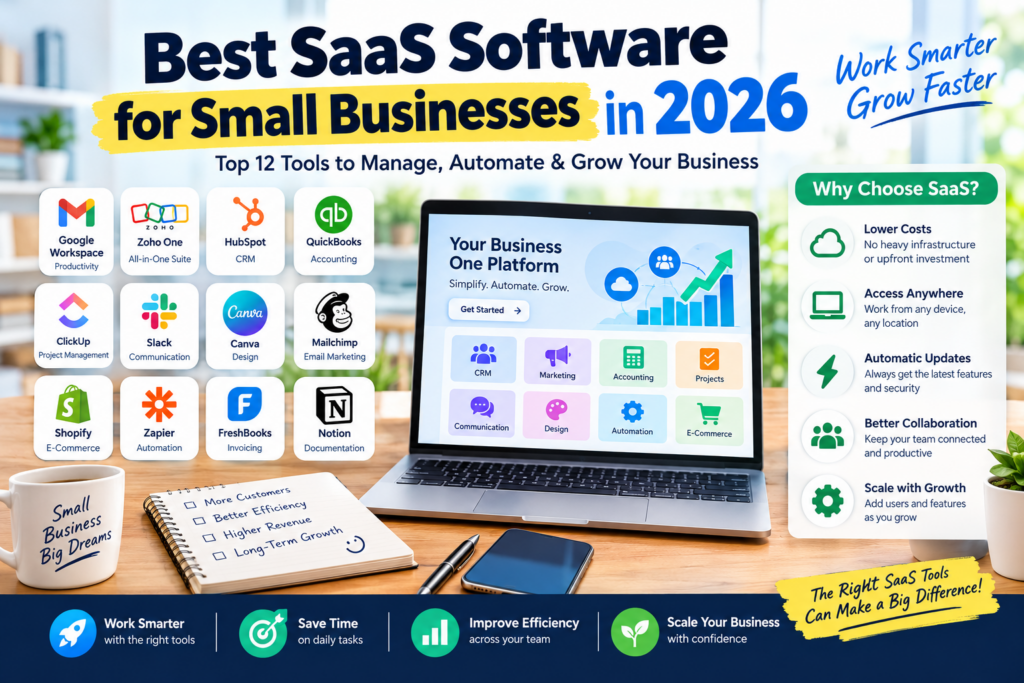
The following platforms cover essential business functions, from productivity and accounting to customer management and automation.
1. Google Workspace — Best for Business Productivity
Google Workspace is a cloud-based productivity suite that helps businesses manage professional email, documents, spreadsheets, meetings, and file storage.
It is particularly useful for small teams that need a centralized environment for everyday communication and collaboration.
Key Features:
- Professional business email through Gmail.
- Document creation with Google Docs.
- Spreadsheets with Google Sheets.
- Presentations with Google Slides.
- Cloud storage through Google Drive.
- Online meetings with Google Meet.
- Shared calendars and collaboration tools.
Pros:
- Familiar and beginner-friendly applications.
- Real-time document collaboration.
- Convenient cloud storage and file sharing.
- Useful integrations with other business applications.
Cons:
- Business subscriptions have recurring costs.
- Storage allowances depend on the plan.
- Some advanced administrative and AI features require specific subscriptions.
Best For: Startups, freelancers, remote teams, consultants, and small businesses.
Why Choose Google Workspace?
Google Workspace is a strong option for businesses that want to manage email, documents, meetings, and file sharing without assembling several unrelated applications.
Official website: https://workspace.google.com/
2. Zoho One — Best All-in-One Business Software
Zoho One is an integrated business software suite that combines multiple applications for sales, marketing, finance, customer support, collaboration, and business operations.
Instead of purchasing separate subscriptions for every department, businesses can explore Zoho’s ecosystem to find applications that work together.
Key Features:
- Customer relationship management.
- Accounting and invoicing applications.
- Email marketing and campaign management.
- Business email and collaboration tools.
- Customer support management.
- Workflow automation and reporting.
Pros:
- Broad collection of business applications.
- Useful integration between supported products.
- Suitable for businesses seeking a connected software ecosystem.
- Can reduce the need to manage multiple unrelated vendors.
Cons:
- The range of features can be overwhelming for beginners.
- Setup and configuration may take time.
- Pricing and available applications depend on the subscription and region.
Best For: Growing startups, service businesses, agencies, and small companies seeking an integrated software ecosystem.
Why Choose Zoho One?
Zoho One is worth considering if you want to consolidate several business functions within one provider rather than build a software stack entirely from separate applications.
Official website: https://www.zoho.com/one/
3. HubSpot — Best for Customer Relationship Management
HubSpot provides customer relationship management (CRM), marketing, sales, and customer service software.
Its CRM capabilities help businesses organize contact information, track potential customers, monitor sales opportunities, and manage customer interactions.
Key Features:
- Contact and company management.
- Sales pipeline tracking.
- Lead management.
- Email and marketing tools.
- Reporting and analytics.
- Workflow automation on eligible plans.
- AI-assisted business features.
Pros:
- Helps centralize customer information.
- Useful for managing sales opportunities.
- Offers entry-level CRM capabilities.
- Supports marketing and sales workflows.
Cons:
- Advanced automation and reporting may require paid plans.
- Costs can increase as teams need additional features.
- Businesses may need training to use the wider platform effectively.
Best For: Startups, B2B companies, consultants, sales teams, and service providers.
Why Choose HubSpot?
HubSpot is a useful starting point for businesses that need to organize customer information and establish a structured sales process.
Official website: https://www.hubspot.com/
4. QuickBooks Online — Best for Accounting and Bookkeeping
QuickBooks Online is cloud-based accounting software designed to help businesses manage financial records and understand their financial position.
It can simplify everyday accounting activities, including invoicing, expense tracking, financial reporting, and bank transaction management.
Key Features:
- Invoice creation and management.
- Expense tracking.
- Financial reporting.
- Bank transaction management.
- Cash-flow monitoring.
- Accounting integrations.
- Tax-related reporting features, depending on the region and plan.
Pros:
- Helps organize business financial records.
- Reduces manual bookkeeping work.
- Offers useful financial reporting tools.
- Supports collaboration with accountants.
Cons:
- Most ongoing use requires a paid subscription.
- Available features vary by country.
- Businesses may need additional tools for specialized tax or compliance requirements.
Best For: Small businesses, consultants, service providers, and companies that need structured financial reporting.
Why Choose QuickBooks Online?
It is worth considering if your business needs cloud-based bookkeeping, financial visibility, and more organized invoicing.
Note for Indian businesses: If your business needs GST-compliant accounting and invoicing, compare QuickBooks alternatives available in India, including Zoho Books and TallyPrime, before choosing a platform.
Official website: https://quickbooks.intuit.com/
5. ClickUp — Best for Project Management
ClickUp is a work management platform that helps teams organize tasks, manage projects, document processes, and monitor progress.
It can be useful for businesses that need to coordinate multiple projects without relying on scattered spreadsheets and email conversations.
Key Features:
- Task and project management.
- Customizable workflows.
- Task assignments and deadlines.
- Project dashboards.
- Documentation and knowledge management.
- Team collaboration.
- AI-assisted productivity features on eligible plans.
Pros:
- Combines multiple work management features.
- Supports customizable project workflows.
- Helps teams monitor responsibilities and deadlines.
- Offers a free entry-level plan.
Cons:
- The number of features may feel overwhelming.
- Advanced capabilities depend on the plan.
- Teams may need time to establish consistent workflows.
Best For: Startups, agencies, software teams, freelancers, and growing businesses.
Why Choose ClickUp?
ClickUp is a strong choice if your team needs one central place to manage tasks, projects, deadlines, and internal documentation.
Official website: https://clickup.com/
6. Slack — Best for Team Communication
Slack is a business communication platform that organizes conversations into channels, allowing employees to communicate about projects, departments, clients, and company activities.
It can reduce unnecessary email exchanges and make it easier for teams to find relevant discussions.
Key Features:
- Organized team messaging.
- Direct messages.
- File sharing.
- Voice and video communication features.
- Searchable conversation history.
- Third-party integrations.
- AI features on eligible plans.
Pros:
- Helps organize internal conversations.
- Integrates with many business applications.
- Useful for remote and hybrid teams.
- Supports project-specific communication channels.
Cons:
- Frequent notifications can become distracting.
- Advanced features require paid plans.
- Important decisions may get lost if conversations are not documented properly.
Best For: Remote teams, startups, agencies, and businesses that rely on frequent internal communication.
Why Choose Slack?
Slack is worth considering if your team needs organized messaging and integrations with project management, development, and productivity tools.
Official website: https://slack.com/
7. Canva — Best for Marketing and Graphic Design
Canva is a visual design platform that allows businesses to create marketing materials without requiring professional graphic design skills.
Small businesses can use it to produce social media posts, advertisements, presentations, brochures, product graphics, and promotional materials.
Key Features:
- Ready-made design templates.
- Drag-and-drop editor.
- Social media graphics.
- Presentation design.
- Image editing and background removal features.
- AI-assisted design and content tools.
- Brand asset management on supported plans.
Pros:
- Easy for beginners to use.
- Supports many marketing formats.
- Offers free design capabilities.
- Helps maintain a consistent visual identity.
Cons:
- Some templates and assets require payment.
- Advanced brand management features may be restricted.
- Complex designs may require professional editing.
Best For: Small businesses, social media managers, marketing teams, freelancers, and online stores.
Why Choose Canva?
Canva is a practical solution for businesses that need attractive marketing graphics without hiring a designer for every small project.
Official website: https://www.canva.com/
8. Mailchimp — Best for Email Marketing
Mailchimp is an email marketing platform that helps businesses create email campaigns, organize subscriber lists, and communicate with customers.
It can support newsletters, product announcements, promotional campaigns, and customer engagement workflows.
Key Features:
- Email campaign creation.
- Subscriber list management.
- Email templates.
- Audience segmentation.
- Marketing automation on eligible plans.
- Campaign performance reports.
- Integration with supported e-commerce platforms.
Pros:
- Simplifies email campaign creation.
- Provides tools for audience management.
- Offers reporting to evaluate campaign performance.
- Supports marketing integrations.
Cons:
- Free-plan availability and limits may change.
- Advanced automation may require a paid subscription.
- Costs can increase as subscriber lists grow.
Best For: Online stores, small e-commerce businesses, content creators, and companies building email lists.
Why Choose Mailchimp?
Mailchimp is useful if email marketing is an important part of your strategy for attracting customers and encouraging repeat purchases.
Official website: https://mailchimp.com/
9. Shopify — Best for E-Commerce Businesses
Shopify is an e-commerce platform that allows businesses to create online stores, manage products, process orders, and sell through supported sales channels.
It is especially useful for businesses that want to sell products online without building an entire e-commerce system from scratch.
Key Features:
- Online store creation.
- Product catalog management.
- Order and inventory management.
- Payment integrations.
- Store themes and customization.
- Marketing integrations.
- Sales reporting.
Pros:
- Designed specifically for online selling.
- Offers an extensive app ecosystem.
- Supports store customization.
- Provides tools for managing products and orders.
Cons:
- Ongoing subscriptions and transaction-related costs may apply.
- Some themes and apps require additional payment.
- Advanced customization may require technical assistance.
Best For: E-commerce startups, retailers, direct-to-consumer brands, and businesses expanding into online sales.
Why Choose Shopify?
Shopify is worth considering if your business needs a dedicated platform for selling products online and managing store operations.
Official website: https://www.shopify.com/
10. Zapier — Best for Workflow Automation
Zapier is an automation platform that connects supported applications and allows businesses to automate repetitive tasks.
For example, a business can configure a workflow that adds a new form submission to a spreadsheet, sends a notification to a team channel, and creates a follow-up task.
Key Features:
- Connections between supported applications.
- Trigger-based workflows.
- Automated data transfer.
- Multi-step workflows on eligible plans.
- Workflow templates.
- AI-assisted automation features, depending on the plan.
Pros:
- Reduces repetitive manual tasks.
- Connects many popular business applications.
- Can improve consistency across workflows.
- Requires little or no traditional coding for many use cases.
Cons:
- Free-plan task limits may be restrictive.
- Complex workflows can require paid plans.
- Poorly configured automations can create duplicate records or errors.
Best For: Small businesses, agencies, online stores, and teams managing repetitive administrative tasks.
Why Choose Zapier?
Zapier is a strong option when you already use several business applications and want them to work together more efficiently.
Official website: https://zapier.com/
11. FreshBooks — Best for Freelancers and Service Businesses
FreshBooks is accounting software designed to help freelancers and service-based businesses manage invoices, expenses, client billing, and financial records.
It is particularly relevant for consultants, designers, independent professionals, and small agencies that need a straightforward way to manage billing.
Key Features:
- Professional invoice creation.
- Expense tracking.
- Time tracking.
- Client management.
- Financial reporting.
- Online payment integrations.
- Project and billing management features.
Pros:
- Useful for client-based businesses.
- Helps organize invoices and expenses.
- Supports time-based billing workflows.
- Reduces administrative work.
Cons:
- Most ongoing use requires a paid plan.
- Feature availability depends on the subscription.
- Businesses with complex accounting needs may require additional software.
Best For: Freelancers, consultants, independent professionals, and small service agencies.
Why Choose FreshBooks?
FreshBooks is worth considering if your business regularly bills clients for projects, services, or hourly work.
Official website: https://www.freshbooks.com/
12. Notion — Best for Documentation and Business Organization
Notion is a flexible workspace that combines documents, databases, notes, and project organization.
Small businesses can use it to maintain internal documentation, prepare meeting notes, manage content calendars, and create standard operating procedures.
Key Features:
- Document creation and editing.
- Team knowledge bases.
- Customizable databases.
- Project and task organization.
- Meeting notes and internal documentation.
- Templates for common business workflows.
- AI-assisted features on supported plans.
Pros:
- Flexible workspace customization.
- Useful for storing company knowledge.
- Combines documentation and lightweight project organization.
- Supports team collaboration.
Cons:
- Requires planning to maintain a well-organized workspace.
- Complex databases and workflows may take time to configure.
- Advanced AI functionality may require additional payment or an eligible subscription.
Best For: Startups, agencies, content teams, freelancers, and businesses that need centralized documentation.
Why Choose Notion?
Notion is a useful option if your business needs a central workspace for notes, internal processes, project information, and shared documentation.
Official website: https://www.notion.so/
Comparison Table: Best SaaS Software for Small Businesses in 2026
Use this comparison to identify the tools that best match your business requirements.
| SaaS Software | Main Category | Best For | Free Option |
|---|---|---|---|
| Google Workspace | Productivity | Email and collaboration | Limited individual tools; business plans are paid |
| Zoho One | Business suite | Integrated business operations | Availability depends on the product and offer |
| HubSpot | CRM | Customer and sales management | Yes, with feature limits |
| QuickBooks Online | Accounting | Financial management | Trial or promotional options may be available |
| ClickUp | Project management | Tasks and team workflows | Yes, with feature limits |
| Slack | Communication | Team messaging | Yes, with feature limits |
| Canva | Design | Marketing graphics | Yes, with premium restrictions |
| Mailchimp | Email marketing | Campaigns and subscriber management | Plan availability and limits vary |
| Shopify | E-commerce | Online stores | Trial or promotional offers may be available |
| Zapier | Automation | Connecting applications | Yes, with task limits |
| FreshBooks | Accounting | Freelancers and client billing | Trial offers may be available |
| Notion | Documentation | Notes and internal knowledge | Yes, with feature limits |
Note: Free-plan availability, subscription pricing, and feature limits can change. Confirm current details on the official websites before purchasing.
How to Choose the Best SaaS Tools for Your Small Business
Choosing the right software is not about purchasing the largest number of applications. It is about finding tools that solve real business problems.
1. Identify Your Business Needs
Start by listing the tasks that consume the most time or create the most problems.
For example:
- If customer information is scattered across spreadsheets, consider a CRM.
- If invoicing and expense tracking are difficult, consider accounting software.
- If deadlines are frequently missed, consider project management software.
- If marketing requires too much manual work, consider email marketing and automation tools.
- If employees struggle to find documents, consider a centralized productivity workspace.
Prioritize the problems that have the greatest impact on your operations.
2. Compare Pricing and Total Cost
A low starting price does not always mean a tool is inexpensive over time.
Consider the number of users, storage requirements, AI usage, premium integrations, payment processing fees, and additional subscriptions.
For a small team, choosing one integrated suite may be more economical than subscribing to several applications with overlapping features.
3. Check Integrations
Your SaaS applications should work together whenever possible.
For example, your CRM might need to connect with your email marketing platform, while your online store might need to connect with your accounting software.
Good integrations reduce duplicate data entry and make business workflows easier to manage.
4. Review Security and Data Ownership
Business applications may contain customer records, invoices, employee information, and confidential documents.
Review the provider’s security controls, access permissions, backup practices, privacy policies, and data export options before uploading important information.
Make sure your business can retrieve essential data if you change software providers.
5. Choose Software That Can Grow With You
Your requirements may change as your business expands.
Look for tools that support additional users, more complex workflows, higher usage limits, and new integrations when necessary.
However, avoid paying for advanced capabilities that your team does not currently need.
Best SaaS Software Stack for Different Small Businesses
Different businesses require different combinations of software. Here are some practical starting points.
SaaS Stack for Freelancers
Freelancers often need tools for billing, client communication, design, and documentation.
A practical starting stack could include:
- Google Workspace: Business email and documents.
- FreshBooks: Invoicing and expense management.
- Canva: Marketing graphics and presentations.
- Notion: Notes and project documentation.
- Calendly: Appointment scheduling, if needed.
Start with the tools that address your most immediate administrative needs.
SaaS Stack for Startups
Startups need software that supports collaboration, customer acquisition, and product development.
A possible starting stack includes:
- Google Workspace: Communication and collaboration.
- HubSpot: Customer and lead management.
- ClickUp: Project and task management.
- Slack: Team communication.
- Zapier: Workflow automation when repetitive tasks emerge.
A small startup can begin with free or entry-level plans and upgrade when the team genuinely needs additional capabilities.
SaaS Stack for E-Commerce Businesses
Online stores need tools for product management, customer communication, accounting, and marketing.
A practical combination could include:
- Shopify: Online store management.
- Mailchimp: Email marketing.
- Canva: Promotional graphics.
- Zoho Books or another suitable accounting platform: Financial records.
- Zapier: Connecting supported applications.
Choose integrations based on your store’s actual requirements and confirm that they support your country, payment methods, and accounting workflow.
SaaS Stack for Digital Marketing Agencies
Marketing agencies often need to manage multiple clients, coordinate projects, and create marketing content.
A useful starting combination includes:
- ClickUp: Project management.
- Canva: Creative production.
- HubSpot: Lead and customer management.
- Google Workspace: Documents and communication.
- Zapier: Workflow automation.
Agencies should also establish appropriate client permissions and processes for handling confidential information.
Common Mistakes to Avoid When Choosing SaaS Software
Even useful software can create problems if it is introduced without a clear purpose.
Buying Too Many Tools
Using too many applications can increase subscription costs and create disconnected workflows.
Start with a small set of essential tools and add new applications only when there is a clear need.
Ignoring Training and Adoption
A powerful platform provides little value if employees do not understand how to use it.
Introduce simple workflows, document important procedures, and give team members time to learn the software.
Overlooking Hidden Costs
Additional users, premium integrations, storage, AI credits, and advanced reporting can increase subscription expenses.
Calculate the expected total cost before committing to a long-term plan.
Neglecting Data Backups and Exports
Do not assume that all your business information will remain accessible in the same format indefinitely.
Regularly review backup options and confirm that important records can be exported.
Automating Inefficient Processes
Automation can save time, but it can also repeat mistakes if the underlying workflow is poorly designed.
Improve the process first, then automate repetitive steps.
Frequently Asked Questions (FAQs)
1. What is the best SaaS software for small businesses in 2026?
The best option depends on your needs. Google Workspace is useful for productivity, HubSpot for customer management, ClickUp for project management, Canva for design, and Zoho One for businesses seeking an integrated software suite.
2. What are the best free SaaS tools for small businesses?
Several platforms offer free plans, including HubSpot, ClickUp, Slack, Canva, Zapier, and Notion. These plans usually have limitations, so compare available features before relying on them for essential business operations.
3. Is SaaS software suitable for startups?
Yes. SaaS applications allow startups to access business software without building and maintaining their own infrastructure. Subscription-based pricing can also help businesses start with a small budget and expand as their requirements grow.
4. How much does SaaS software cost for a small business?
Costs vary depending on the provider, number of users, subscription tier, and required features. Some tools offer free plans, while others charge monthly or annual subscriptions. Businesses should also account for integrations, payment fees, and optional AI features.
5. Which SaaS software is best for accounting?
QuickBooks Online and FreshBooks are useful options in markets where they are supported. For Indian businesses requiring GST-related functionality, Zoho Books and TallyPrime are also worth evaluating.
6. Can SaaS software help automate business operations?
Yes. Platforms such as Zapier connect supported applications and automate repetitive tasks. CRM, accounting, email marketing, and project management tools may also provide built-in automation features.
7. Is SaaS software secure for small businesses?
Many SaaS providers offer security measures such as encryption, access controls, and account protection features. However, security depends on the provider, configuration, and how employees use the software. Review each provider’s security documentation and enable appropriate account protections.
8. How do I choose the right SaaS tools for my business?
Identify your main operational challenges, compare relevant features and costs, check integrations, review security and data export options, and test the software before committing to a long-term subscription.
Conclusion: Choose the Right SaaS Software to Grow Your Business
The best SaaS software for small businesses in 2026 can help simplify daily operations, improve productivity, organize customer information, and reduce repetitive administrative work.
Google Workspace is a strong option for business productivity, HubSpot helps manage customers, ClickUp organizes projects, and Canva simplifies marketing design. QuickBooks Online and FreshBooks support accounting workflows, while Shopify helps businesses sell products online. Tools such as Zapier can connect applications and automate repetitive processes.
However, the ideal software stack depends on your business model, team size, budget, and operational requirements.
Our recommendation: Start with three essentials: a productivity suite, suitable accounting software, and a CRM if customer management is important to your business. Add project management, marketing, and automation tools as your needs develop.
Instead of subscribing to every popular platform, choose a small collection of reliable tools that work well together.
With the right SaaS strategy, your business can reduce manual work, improve collaboration, and build a more efficient foundation for long-term growth.