Introduction Klap Review
Creating engaging YouTube Shorts, Instagram Reels, and TikTok videos takes more work than simply cutting a few seconds from a longer recording. You need to identify interesting moments, trim unnecessary footage, adjust the aspect ratio, add captions, and make sure every clip works as a standalone video.
This is where AI-powered video clipping tools can help.
Klap is an AI video repurposing tool that transforms long-form videos into short, vertical clips suitable for social media. Instead of manually searching through an entire podcast, webinar, interview, or YouTube video, you can let Klap identify potential highlights and turn them into short videos with captions and automatic reframing.
Best AI Tools for content creators who want to publish more short-form content without spending hours editing, Klap offers a convenient workflow.
But is Klap worth using? How does it work, and how does it compare with alternatives such as Opus Clip and Vizard?
In this review, we’ll explore Klap’s features, benefits, limitations, practical workflow, and the types of creators who may benefit most from it.
What is Klap AI?
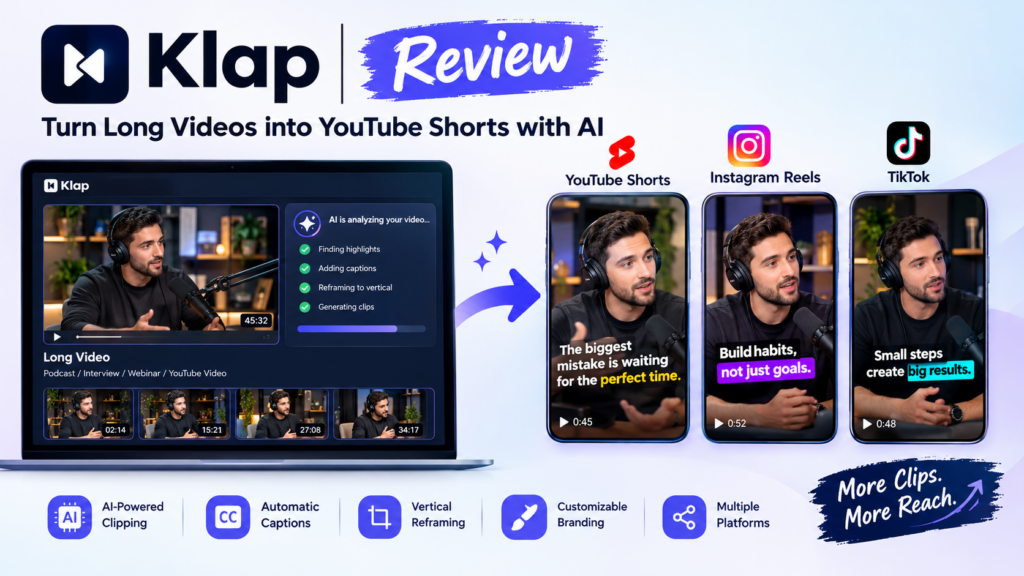
Klap is a browser-based AI video editing tool designed to repurpose long videos into shorter social media clips.
You can provide a supported video link or upload a video file. Klap analyzes the content and identifies potentially interesting segments that can be converted into vertical videos.
The platform automates several time-consuming editing tasks, including:
- AI-powered clipping: Identifies promising moments in longer recordings.
- Automatic captions: Adds subtitles to make spoken content easier to follow.
- AI reframing: Adjusts the video layout for vertical viewing.
- Speaker tracking: Helps keep the main speaker visible in the frame.
- Clip customization: Allows you to adjust the appearance of your videos.
- Social media publishing: Supports sharing workflows for distributing finished clips.
Klap is particularly useful for spoken-word content, including podcasts, interviews, educational videos, webinars, and talking-head recordings.
For example, imagine you publish a 60-minute podcast on YouTube. Instead of watching the entire recording again to find short, interesting moments, you can use Klap to generate a selection of potential clips. You can then Klap review the results, edit the strongest moments, and prepare them for YouTube Shorts, TikTok, and Instagram Reels.
The goal is simple: get more short-form content from videos you’ve already created.
Key Features of Klap
1. AI-Powered Video Clipping
One of Klap’s main features is its ability to identify potential highlights automatically.
When you submit a long video, the AI analyzes its content and selects segments that may work as independent short videos. This can reduce the need to scrub through hours of footage manually.
For example, a podcast discussing business growth might contain several useful moments:
- A practical tip for starting a business.
- A surprising lesson from an entrepreneur.
- A common mistake beginners should avoid.
- A short discussion about marketing strategies.
Klap can help turn these moments into separate clips that are easier to share on social platforms.
However, AI-selected highlights aren’t guaranteed to perform well. You should review each clip to ensure the context is clear and the opening captures the viewer’s attention.
2. Automatic Vertical Video Reframing
Traditional YouTube videos are commonly recorded in a horizontal 16:9 format, while YouTube Shorts, TikTok, and Instagram Reels generally favor vertical 9:16 videos.
Manually converting horizontal footage into vertical clips can be frustrating, particularly when speakers move around the frame.
Klap’s AI reframing feature helps adjust the composition for vertical viewing. It can reposition the visible area to keep the primary subject in focus.
This is especially useful for:
- Video podcasts featuring one or two speakers.
- Interviews and talking-head videos.
- Online courses and educational recordings.
- Business presentations and webinars.
The results can still require manual correction, particularly when multiple speakers appear simultaneously or important visual details sit near the edges of the original frame.
3. AI-Generated Captions and Subtitles
Captions are important for short-form videos because many viewers watch social content without sound.
Klap automatically generates subtitles for spoken content, reducing the need to transcribe and time every sentence manually.
Captions can make clips easier to understand, improve accessibility, and help viewers follow the discussion.
Depending on your editing requirements, you may want to review the generated subtitles before publishing. Technical terminology, personal names, accents, and specialized vocabulary can occasionally produce transcription errors.
4. Customization and Branding
AI-generated clips provide a starting point, but creators often need their videos to match a consistent visual identity.
Klap provides customization options that can help you adjust the appearance of your clips, including caption styling, colors, fonts, branding elements, and framing.
This is particularly useful for businesses, marketing agencies, and creators who publish videos regularly.
A consistent style can help your content look more professional across different platforms.
5. Support for Multiple Social Platforms
Klap is designed to help creators repurpose existing videos for several short-form platforms.
Rather than producing a separate video from scratch for each channel, you can create a suitable clip and prepare it for platforms such as:
- YouTube Shorts
- Instagram Reels
- TikTok
This approach can make it easier to maintain a regular publishing schedule without creating entirely different videos for every platform.
Always check the latest export and publishing options available in your account before choosing a subscription.
6. A Faster Content Repurposing Workflow
Klap’s biggest advantage is that it brings several editing tasks into one workflow.
Instead of manually selecting highlights, creating vertical crops, and generating subtitles in separate applications, you can automate much of the initial work.
This can be particularly valuable when you publish multiple long videos every week.
The time saved depends on the length of your recordings, the quality of the AI-selected clips, and how much editing each final video requires.
Who Should Use Klap?
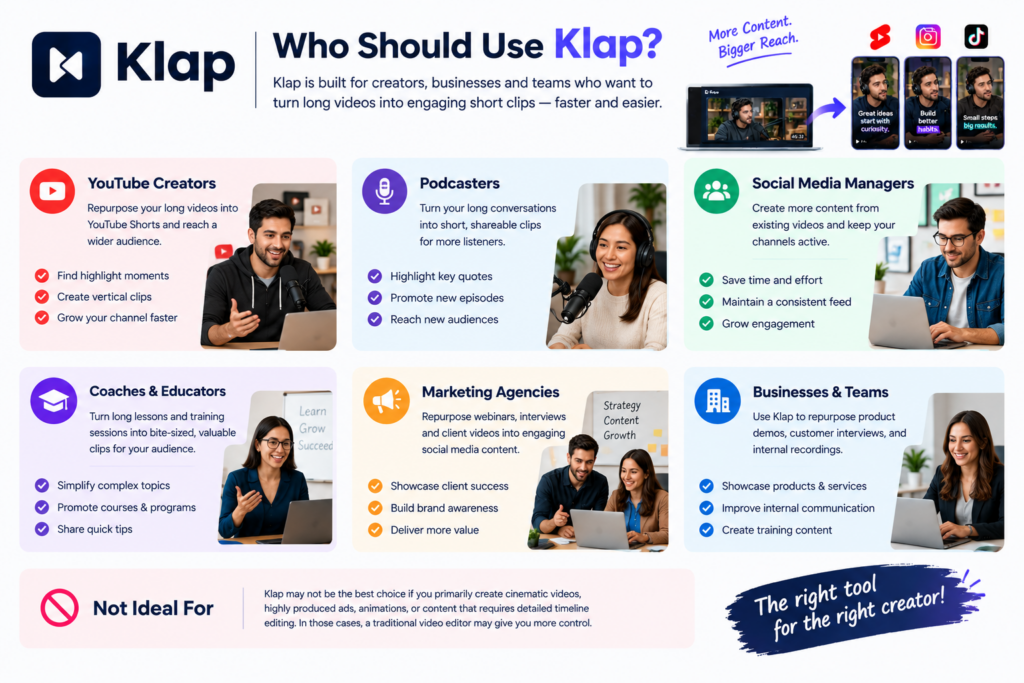
Klap is most useful for people who regularly produce long-form videos and want to turn them into additional short-form content.
YouTube Creators
YouTube creators can repurpose their existing videos into Shorts without building every clip from scratch. AI Tools for YouTube Creators: Edit Videos, Create Thumbnails
For example, a 30-minute tutorial might contain several short tips that can be published separately.
Podcasters
Podcasters often record long conversations containing memorable quotes, interesting stories, and useful advice.
Klap can help identify these moments and convert them into clips for promoting episodes and reaching new audiences.
Social Media Managers
Social media managers responsible for multiple accounts can use AI clipping to produce more content from existing recordings.
This is useful for organizations that publish interviews, product demonstrations, expert discussions, or educational content.
Coaches and Educators
Online educators, trainers, and coaches can turn long lessons into shorter videos focused on individual concepts.
These clips can be used to promote courses, share educational tips, or introduce viewers to longer lessons.
Marketing Agencies
Marketing agencies can use Klap to repurpose webinars, customer interviews, founder discussions, and recorded presentations.
However, agencies should review the output carefully to maintain brand consistency and ensure the clips accurately represent the original message.
Who Might Not Need Klap?
Klap may not be the best choice if you primarily create cinematic videos, highly produced advertisements, animation, or content that requires detailed timeline editing.
It is also less useful if you rarely publish videos or prefer to select every frame manually.
In those situations, a conventional video editor may provide more control than an automated clipping platform.
How to Use Klap: A Quick Step-by-Step Walkthrough
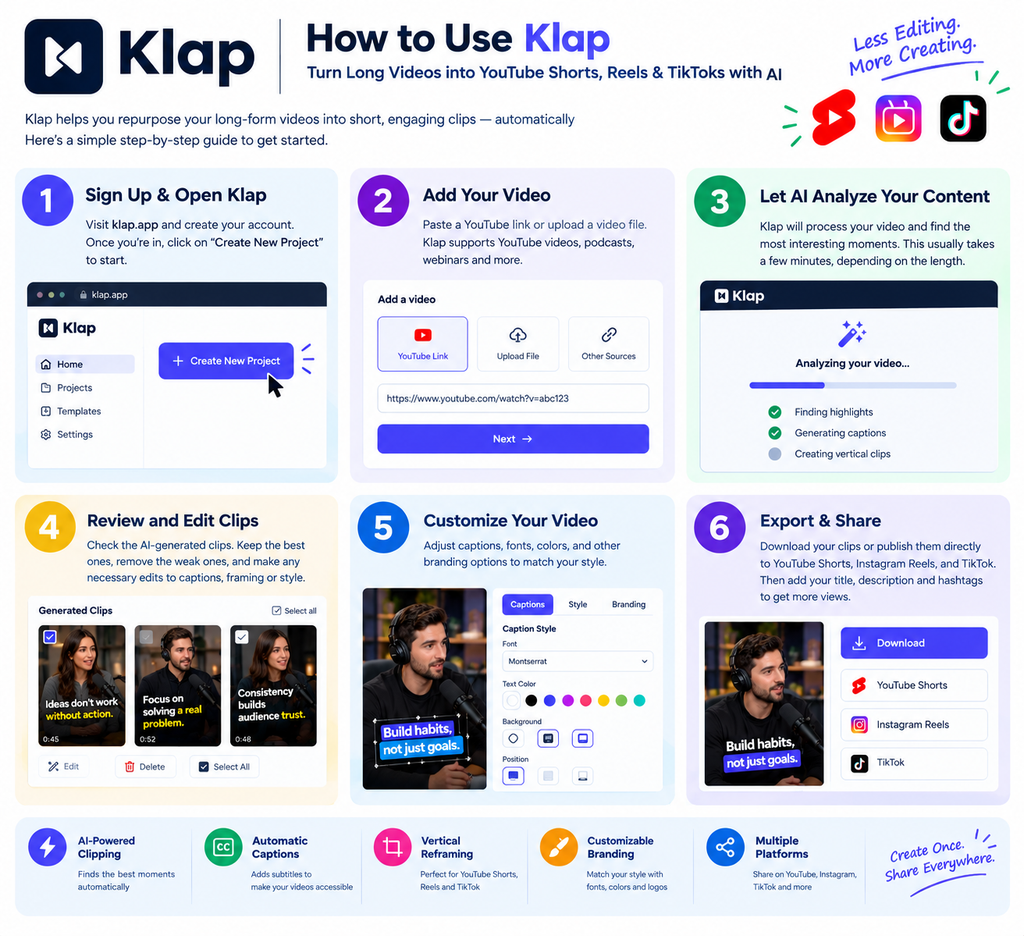
One of Klap’s main selling points is its straightforward workflow. You don’t need professional video-editing experience to start creating short clips.
Here’s how to turn one long video into several potential YouTube Shorts.
Step 1: Open Klap and Add Your Video
Visit the official Klap website and create an account if required.
You can start by pasting a supported YouTube video link or uploading a video file.
For this example, imagine you have a 45-minute podcast discussing entrepreneurship, marketing, and business growth.
Instead of editing the recording manually, you’ll use Klap to identify potential highlights.
Step 2: Let the AI Analyze Your Content
Once you submit the video, Klap processes it and identifies segments that may work as standalone clips.
The system looks for promising moments in the original recording and prepares shorter videos.
Depending on your content, the generated clips might include:
- A useful business tip.
- An interesting statement from the guest.
- A short explanation of a marketing concept.
- An engaging question-and-answer segment.
Processing time and the number of usable clips can vary depending on the video’s length, content, and account limits.
Step 3: Review the Generated Clips
After processing, review the clips Klap generates.
This is an important step because an AI-selected moment isn’t automatically a good social media video.
Check whether each clip:
- Starts with an interesting statement or question.
- Communicates one clear idea.
- Includes enough context to make sense.
- Avoids unnecessary pauses or awkward cuts.
- Ends naturally rather than cutting off a sentence.
Remove weak clips and prioritize those that offer useful information, entertainment, or a compelling perspective.
Step 4: Customize Captions and Framing
Next, inspect the vertical framing and subtitles.
Make sure the speaker’s face remains visible and that important details aren’t cropped out. If the original video contains multiple speakers, check that the layout works throughout the clip.
Review the captions for spelling, punctuation, and transcription mistakes.
You can also adjust available styling options to match your brand’s visual identity.
Step 5: Export and Publish Your Shorts
Once you’ve finished editing, export the clips using the options available in your plan.
You can then prepare them for YouTube Shorts, Instagram Reels, and TikTok.
Consider adjusting the title, description, opening hook, and caption for each platform instead of publishing every clip with identical metadata.
Practical tip: Don’t publish every clip just because the AI generated it. A smaller collection of useful, well-edited videos is often a better starting point than dozens of weak clips.
Klap Pricing: Is It Worth the Money?
Klap offers a free trial that lets users try the platform on one video without providing a credit card. However, downloading and publishing clips may require a paid subscription.
The official pricing page has listed the following annual-billing plans:
| Plan | Advertised Price | Monthly Clip Allowance |
|---|---|---|
| Basic | $14/month | 100 clips |
| Pro | $39/month | 300 clips |
| Pro+ | $94/month | 1,000 clips |
These are advertised monthly equivalents billed annually, not necessarily month-to-month prices. Pricing, plan limits, and features can change, so check the current details on the official Klap pricing page before subscribing.
Which Plan Should You Choose?
Basic: Suitable for individual creators who publish a moderate number of short videos and want to automate basic clipping tasks.
Pro: Worth considering for regular podcasters, YouTubers, and marketers who need a larger monthly clip allowance.
Pro+: Better suited to teams or high-volume creators who repurpose many recordings each month.
Before choosing a plan, estimate how many clips you’ll actually publish. Generating 100 clips per month isn’t particularly valuable if you only have time to review and publish 15.
Also consider whether the subscription saves enough editing time to justify its cost.
Klap vs. Opus Clip vs. Vizard
Klap isn’t the only tool that turns long videos into short-form content. Two notable alternatives are OpusClip and Vizard.
All three automate parts of the clipping process, but their additional features and workflows can influence which one is best for you.
1. Klap
Klap focuses on turning long-form videos into short, vertical clips with minimal manual effort.
Its main strengths include automated highlight selection, captions, vertical reframing, and customization. Its newer AI video clipping tool for creators Reframe feature also supports different layouts for content such as split-screen videos and screencasts.
Klap is worth considering if you want a straightforward way to repurpose podcasts, interviews, and YouTube recordings.
Explore the Klap website.
2. Opus Clip
OpusClip offers AI clipping, automatic captions, reframing, and additional editing features.
Its feature set includes AI B-roll, audio enhancement, and AI voice-over capabilities. It also supports video sources from several services, including YouTube, Google Drive, Vimeo, Zoom, and Twitch on supported plans.
Opus Clip is worth considering if you want more editing capabilities and a broader set of tools for turning long recordings into polished social media videos.
Explore the OpusClip website.
3. Vizard
Vizard combines automated clip generation with editing tools designed for creators and marketing teams.
It can identify potential highlights, create captions, reframe videos, and help users edit the results. Its workflow is relevant to podcasters, educators, agencies, and businesses that want to reuse webinars or interviews for social media.
Vizard is worth testing if you want an accessible clipping workflow with additional editing flexibility.
Explore the Vizard website.
Feature Comparison
| Feature | Klap | Opus Clip | Vizard |
|---|---|---|---|
| AI highlight selection | Yes | Yes | Yes |
| Automatic captions | Yes | Yes | Yes |
| Vertical video reframing | Yes | Yes | Yes |
| Multiple clip generation | Yes | Yes | Yes |
| AI B-roll | Check current plan and features | Available | Available features vary |
| Advanced editing options | Available | Extensive feature set | Available |
| Suitable for podcasts | Yes | Yes | Yes |
| Suitable for webinars | Yes | Yes | Yes |
| Best reason to consider it | Streamlined repurposing | Broader AI editing toolkit | Clipping with editing flexibility |
Feature availability can vary by subscription, and the tools evolve regularly. Review each vendor’s current offering before making a decision.
Which Tool Is Better?
The best choice depends on your workflow rather than the number of features on a pricing page.
- Choose Klap if your priority is a relatively straightforward way to extract short clips from long videos.
- Choose Opus Clip if you want a broader collection of AI editing capabilities alongside clipping.
- Choose Vizard if you want to combine AI clip generation with additional editing and content-repurposing tools.
If you’re undecided, test the same video in each platform. Compare the selected moments, caption accuracy, framing, editing time, and final output quality. This provides a more useful comparison than relying on marketing claims alone.
Pros and Cons of Klap
Pros
1. Saves editing time
Klap automates much of the initial work involved in finding and preparing short clips.
2. Makes repurposing easier
You can reuse podcasts, interviews, webinars, and existing YouTube videos instead of recording new content for every platform.
3. Automatically generates captions
Built-in subtitles reduce the need to create captions manually.
4. Simplifies vertical formatting
AI reframing helps adapt horizontal recordings to vertical social media formats.
5. Supports a repeatable workflow
Creators can process recordings regularly and develop a consistent short-form publishing routine.
6. Offers a way to test the product
The free trial lets you evaluate the initial output before committing to a subscription, although exporting may require payment.
Cons
1. AI doesn’t always choose the best moments
Some generated clips may lack a strong hook or enough context.
2. Manual review is still necessary
Captions, cuts, and framing can require corrections before publication.
3. Subscription costs can add up
The platform may be difficult to justify if you publish only occasionally.
4. Not a replacement for every video editor
Complex storytelling, cinematic transitions, detailed sound design, and frame-by-frame adjustments may require a separate editing application.
5. Results depend on the source material
A clear, engaging podcast may produce useful clips more easily than a poorly recorded webinar or a presentation containing little spoken commentary.
Is Klap Worth It?
Klap is worth considering if you regularly publish long-form videos and want to turn them into short-form content without editing every clip from scratch.
Its biggest advantage is convenience. You can submit a recording, let AI identify potential highlights, review the results, and prepare suitable clips for social media.
For podcasters, YouTube creators, educators, and social media managers, this can make content repurposing considerably easier.
However, Klap shouldn’t be treated as a fully automatic content strategy. AI can help identify and edit moments, but it cannot guarantee that viewers will find them interesting or that they will generate engagement.
You’ll still need to choose strong hooks, verify context, correct mistakes, and understand what your audience wants to watch.
If you publish videos regularly, the time saved may justify the subscription. If you only need a few clips occasionally, try the free option first and compare the results with other tools before paying.
Affiliate disclosure
Ready to turn your long videos into engaging YouTube Shorts, Instagram Reels, and TikTok clips? Klap AI makes video repurposing easier with AI-powered clipping, automatic captions, and smart vertical reframing. Whether you’re a YouTube creator, podcaster, or digital marketer, Klap can help you save editing time and create more content from videos you already have. Try Klap AI here and explore its features to see whether it fits your content creation workflow. If you sign up or purchase through Klap AI Affiliate link, we may earn a commission at no additional cost to you.
Final Verdict
Klap is a useful AI video clipping tool for creators who want to turn long videos into YouTube Shorts, TikToks, and Instagram Reels with less manual editing.
Its combination of AI highlight selection, automatic captions, and vertical reframing makes it a practical option for repurposing existing content.
Opus Clip may be a better fit if you need a broader collection of AI editing features, while Vizard is another strong option to evaluate for its combination of clipping and editing tools.
Ultimately, the best tool is the one that consistently produces usable clips from your own recordings while fitting your budget and publishing workflow.
Our recommendation: Start by testing Klap with one of your existing videos. If the generated clips are relevant, well-framed, and require relatively little correction, consider whether a paid plan makes sense for your publishing volume.
Frequently Asked Questions
1. What is Klap AI used for?
Klap is used to convert long-form videos into short vertical clips for platforms such as YouTube Shorts, Instagram Reels, and TikTok. It automates highlight selection, caption generation, and video reframing.
2. Can Klap turn YouTube videos into Shorts?
Yes. Klap supports a workflow in which users submit a supported YouTube video link and generate shorter clips. The resulting videos can be reviewed, customized, and exported using the available account features.
3. Can I use Klap for podcasts and webinars?
Yes. Podcasts, interviews, webinars, educational recordings, and other videos featuring spoken content are suitable use cases.
4. Is Klap free?
Klap offers a free trial for one video without requiring a credit card. Downloading and publishing clips may require a paid subscription. Check the official website for current terms.
5. Is Klap better than Opus Clip?
Neither tool is automatically better for every creator. Klap focuses on streamlined video repurposing, while Opus Clip offers additional AI editing capabilities. Testing both with the same recording is the best way to compare them.
6. Is Klap better than Vizard?
It depends on your needs. Klap is worth considering for a straightforward clipping workflow, while Vizard offers AI clipping alongside editing and content-repurposing features. Compare their current plans and outputs before deciding.
7. Do I need video-editing experience to use Klap?
No professional editing experience is required to get started. However, basic editing knowledge can help you improve hooks, fix captions, refine framing, and produce more polished clips.
8. Can Klap guarantee viral videos?
No. Klap can help automate clipping and identify potentially interesting moments, but no AI video tool can guarantee views, engagement, or viral success.
9. Who should consider using Klap?
YouTube creators, podcasters, marketers, educators, and agencies that regularly produce long-form videos are the most likely to benefit.
10. Is Klap worth paying for?
It may be worthwhile if you regularly need short clips and the tool reduces your editing workload. Try the free option first and evaluate the quality of its output before committing to a paid plan.