
AI Tools for YouTube Creators: Edit Videos, Create Thumbnails
Creating engaging YouTube videos takes time, creativity, and consistency. From brainstorming video ideas and writing scripts to editing footage, designing thumbnails, and optimizing videos for search, content creators often have to manage multiple tasks at once.
Fortunately, artificial intelligence is making YouTube content creation faster and more accessible. The best AI tools for YouTube creators in 2026 can help automate repetitive tasks, improve video quality, generate compelling thumbnails, and simplify channel management.
Whether you are a beginner, a professional YouTuber, a video editor, or a faceless channel owner, AI-powered software can help you spend less time on technical work and more time creating content your audience loves.
In this guide, we will explore the best AI tools for YouTube creators, including tools for video editing, thumbnail design, scriptwriting, voiceovers, and channel automation.
Why Should YouTube Creators Use AI Tools in 2026?
AI tools are becoming valuable assistants for creators who want to produce quality content without increasing their workload. Instead of completing every task manually, creators can use AI to speed up specific parts of the production process.
Here are some major benefits:
- Save time: Automate repetitive editing, transcription, captioning, and content planning tasks.
- Create better thumbnails: Design eye-catching visuals that communicate the value of your videos.
- Improve editing efficiency: Remove silences, generate captions, and repurpose long videos into short clips.
- Optimize videos for search: Get assistance with titles, descriptions, keywords, and content ideas.
- Maintain consistency: Build a more manageable publishing workflow.
- Reduce production costs: Handle certain tasks independently instead of outsourcing every part of video production.
AI does not replace the need for original ideas, storytelling, and audience understanding. Instead, it gives creators more time to focus on the parts of content creation that matter most.
1. Best AI Thumbnail Maker Tools for YouTube
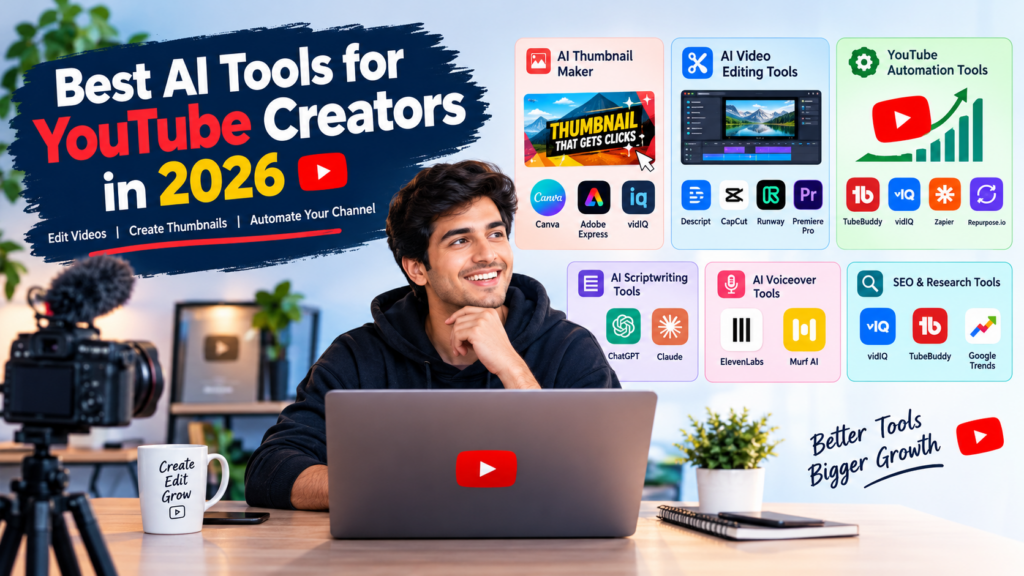
Your thumbnail is one of the first things viewers notice when they discover a video. A clear, attractive thumbnail can help communicate your topic and encourage people to click.
An AI thumbnail maker helps creators generate visual concepts, remove backgrounds, improve images, and create professional-looking designs without advanced graphic design skills.
Canva
Canva is a popular design platform for YouTube thumbnails, channel banners, and social media graphics. Its AI-powered design features can help creators generate visual ideas, edit images, and customize ready-made templates.
Best for: Beginners, solo creators, and creators who want an easy thumbnail design workflow.
Key benefits:
- Customizable YouTube thumbnail templates.
- AI-assisted image generation and editing features.
- Background removal and other image-editing capabilities, depending on the plan.
- Consistent branding across thumbnails and channel graphics.
Adobe Express
Adobe Express offers design templates and AI-powered creative features that help creators produce polished graphics. It is useful for designing thumbnails, promotional images, and other assets for a YouTube channel.
Best for: Creators who want branded designs and accessible creative tools.
Key benefits:
- Thumbnail templates and customizable layouts.
- AI-assisted image creation and editing.
- Text effects and background editing.
- Design options for multiple social platforms.
vidIQ
vidIQ focuses on YouTube growth, keyword research, and channel optimization. Its AI-powered features can assist with video ideas and packaging, making it a useful companion when planning thumbnails and titles.
Best for: Creators who want to improve their YouTube content strategy alongside their visual presentation.
Key benefits:
- AI-assisted video idea generation.
- Keyword research and topic discovery.
- Support for titles and content optimization.
- Tools to help creators understand opportunities in their niche.
Thumbnail tip: Use a clear focal point, readable text, and a visual that accurately represents your video. AI-generated designs should be reviewed for awkward text, distracting details, and misleading imagery.
2. Best AI Video Editing Tools for YouTube
Editing can consume a large portion of a creator’s production time. AI video editing tools simplify common tasks such as removing pauses, generating subtitles, cleaning up audio, and transforming long videos into shorter clips.
Descript
Descript offers a transcript-based editing workflow. Instead of editing only through a traditional video timeline, creators can edit spoken content by modifying its transcript.
Best for: Talking-head videos, interviews, podcasts, tutorials, and educational content.
Key benefits:
- Transcript-based audio and video editing.
- Automatic transcription and captioning.
- Tools for reducing unwanted filler words and improving speech.
- Audio cleanup features, depending on the plan.
CapCut
CapCut is a widely used video editor for short-form content and social media videos. Its AI-assisted features can help creators add captions, apply effects, and prepare vertical videos for YouTube Shorts.
Best for: Beginners, Shorts creators, and social media-focused channels.
Key benefits:
- Automatic caption generation.
- Templates, effects, and transitions.
- AI-assisted editing features.
- Vertical video editing for Shorts and other platforms.
Feature availability can vary by region, device, and subscription.
Runway
Runway provides AI-powered creative tools for generating and editing video. It can help creators experiment with generated visuals, stylized scenes, and creative effects.
Best for: Creators who want original visual sequences, experimental content, and AI-assisted production.
Key benefits:
- AI video generation and editing capabilities.
- Creative visual effects.
- Tools for experimenting with scenes and visual styles.
- Potential to support visual storytelling without filming every shot.
Generated footage should be checked carefully for visual inconsistencies and suitability for the intended video.
Adobe Premiere Pro
Adobe Premiere Pro is a professional video editing application with AI-assisted capabilities that can support tasks such as transcription, captioning, audio enhancement, and editing workflows.
Best for: Professional YouTubers, advanced editors, and production teams.
Key benefits:
- Advanced timeline editing.
- AI-assisted transcription and caption workflows.
- Audio tools and color correction.
- Integration with other Adobe creative applications.
Editing tip: Choose a tool based on your content format. A Shorts creator may prefer a fast mobile-friendly editor, while a filmmaker or long-form educator may need more advanced timeline controls.
3. Best YouTube Automation Tools for Creators
YouTube automation involves simplifying repetitive channel tasks, such as planning uploads, generating captions, organizing production, and repurposing content. The goal is to make publishing more efficient while maintaining quality and originality.
The best YouTube automation tools assist with individual parts of the workflow rather than replacing the creator’s judgment.
TubeBuddy
TubeBuddy provides YouTube-focused tools for channel management, keyword research, and content optimization.
Best for: Creators who want a more organized approach to video publishing and optimization.
Key benefits:
- Keyword research and topic exploration.
- Tools to support title and metadata optimization.
- Workflow assistance for managing channel content.
- Features designed specifically for YouTube creators.
vidIQ
vidIQ combines channel research and AI-assisted ideation with tools for discovering topics and improving video strategy.
Best for: Creators who want help finding content opportunities and planning future uploads.
Key benefits:
- Video topic and keyword research.
- AI-assisted brainstorming.
- Channel growth insights.
- Assistance with titles and descriptions.
Zapier
Zapier connects supported apps and automates workflows between them. For example, a creator might connect a content calendar with a project management tool or trigger a notification when a new production task is created.
Best for: Creators, agencies, and teams managing multiple production steps.
Key benefits:
- Connects compatible apps and services.
- Automates repetitive administrative tasks.
- Supports content planning and team notifications.
- Reduces manual work across a production workflow.
Available integrations and actions depend on the connected apps and selected plans.
Repurpose.io
Repurpose.io focuses on distributing and repurposing content across supported platforms. It can help creators build workflows for adapting existing videos and publishing content to multiple destinations.
Best for: Creators who publish across YouTube and other social platforms.
Key benefits:
- Content repurposing workflows.
- Support for distributing content across supported platforms.
- Reduced manual uploading and repetitive publishing tasks.
- More efficient reuse of existing content.
Important: Automation should support original content creation, not mass-produce repetitive or low-value videos. Creators should review automated outputs, respect platform policies, and make sure they have the necessary rights to use their content and assets.
4. Best AI Tools for YouTube Scriptwriting
A strong script helps videos maintain a clear structure, communicate useful information, and hold viewers’ attention. AI writing assistants can help creators brainstorm topics, develop outlines, and refine scripts.
ChatGPT
ChatGPT can assist with brainstorming video ideas, outlining scripts, writing introductions, developing explanations, and generating calls to action.
Best for: Creators who need help with planning, research organization, and scripting.
Key benefits:
- Video idea brainstorming.
- Script outlines and draft creation.
- Title and description suggestions.
- Repurposing long-form scripts into Shorts concepts.
Review facts, add your own experience, and adapt each script to your natural speaking style.
Claude
Claude can help creators organize complex topics, refine drafts, and develop structured explanations for educational or long-form content.
Best for: Creators who produce tutorials, commentary, educational videos, and detailed explainers.
Key benefits:
- Script outlining and refinement.
- Summarizing source material provided by the user.
- Improving clarity and flow.
- Developing alternative introductions and narrative structures.
AI-written scripts work best when combined with original insights, reliable research, and a distinct creator voice.
5. Best AI Voiceover Tools for YouTube
Voiceovers are useful for explainers, tutorials, documentaries, and channels that do not show the creator on camera. AI voice generators can turn written scripts into spoken audio.
ElevenLabs
ElevenLabs provides AI voice generation and related audio tools for producing narration and other spoken content.
Best for: Narration-heavy videos, educational explainers, and creators who need synthetic voiceovers.
Key benefits:
- Text-to-speech generation.
- A range of voice options and speaking styles.
- Support for different languages and voice workflows, depending on the product.
- Tools for creating narration without recording every line manually.
Murf AI
Murf AI is a voice generation platform designed for narration, presentations, and other voiceover projects.
Best for: Business videos, training content, explainers, and presentation-style videos.
Key benefits:
- Text-to-speech voiceovers.
- Voice and delivery customization.
- Narration workflows for video projects.
- Support for different production needs depending on the plan.
Always check voice licensing and usage rights before publishing commercial content. If you clone or reproduce a real person’s voice, make sure you have appropriate permission.
6. Best AI Tools for YouTube SEO and Content Research
YouTube SEO helps creators make their content easier for relevant viewers to discover. AI-assisted research can help identify topics, organize keywords, and draft metadata that accurately reflects a video’s content.
Useful tools include:
- vidIQ: For keyword research, topic ideas, and channel insights.
- TubeBuddy: For YouTube-focused optimization and channel workflows.
- ChatGPT: For brainstorming titles, organizing keywords, and drafting descriptions.
- Google Trends: For exploring changes in search interest and comparing topic popularity.
AI can generate many title ideas quickly, but the best title is specific, accurate, and compelling. Avoid keyword stuffing or promising something the video does not deliver.
7. How to Choose the Best AI Tools for Your YouTube Channel
Not every creator needs every tool. The right combination depends on your content format, budget, experience, and publishing schedule.
| Creator Type | Recommended Tools | Main Goal |
|---|---|---|
| Beginner YouTuber | Canva, CapCut, ChatGPT | Create and publish videos efficiently |
| Shorts Creator | CapCut, Canva, Repurpose.io | Edit and repurpose short-form content |
| Educational Creator | Descript, ChatGPT, Canva | Produce clear tutorials and explanations |
| Faceless Channel | ChatGPT, ElevenLabs, CapCut | Support scripting, narration, and editing |
| Professional Editor | Premiere Pro, Runway, Descript | Improve editing and creative workflows |
| Channel Manager | TubeBuddy, vidIQ, Zapier | Organize research and repetitive tasks |
Tool capabilities and pricing can change, so check each provider’s current features, usage limits, and subscription terms before choosing a paid plan.
8. How to Build an AI-Powered YouTube Workflow
You do not need dozens of subscriptions to create a productive channel. Start with a small collection of tools that address your biggest bottlenecks.
Step 1: Research Your Video Topic
Use YouTube research tools, search trends, and audience feedback to identify relevant topics. AI can help turn a broad subject into specific video ideas.
Step 2: Write Your Script
Use an AI writing assistant to create an outline and first draft. Add verified facts, examples, personal insights, and a strong narrative structure.
Step 3: Create Your Thumbnail
Use an AI thumbnail maker or a design platform to develop a clear visual concept. Keep the thumbnail readable at small sizes and ensure it accurately represents the video.
Step 4: Record and Edit Your Video
Record original footage or narration, then use AI video editing tools to generate captions, remove unnecessary pauses, enhance audio, or create short clips.
Step 5: Optimize Your Metadata
Draft a descriptive title, video description, and relevant keywords. Review every suggestion for accuracy and clarity before publishing.
Step 6: Schedule and Repurpose Content
Use your channel’s available publishing features or compatible automation tools to organize uploads and adapt suitable clips for other platforms.
Step 7: Analyze Performance
Review YouTube Analytics to understand impressions, click-through rate, audience retention, watch time, and returning viewers. Use those insights to improve your next video.
9. Are AI Tools Allowed on YouTube in 2026?
AI tools can be used in YouTube production, but using AI does not automatically make every video suitable for monetization.
Creators should focus on original, useful content that provides value to viewers. Repetitive, mass-produced, or minimally transformed content may face monetization problems under YouTube’s applicable policies.
Creators should also follow YouTube’s rules for disclosing realistic altered or synthetic content when disclosure is required. Copyright, music licensing, privacy, impersonation, and other platform requirements still apply.
Before publishing, review YouTube’s current policies on monetization, reused or repetitive content, and altered or synthetic media.
Conclusion
The best AI tools for YouTube creators in 2026 can make content production more efficient, from brainstorming ideas and writing scripts to designing thumbnails, editing videos, generating voiceovers, and organizing publishing workflows.
For thumbnails, Canva and Adobe Express are useful starting points. For editing, Descript, CapCut, Premiere Pro, and Runway offer different capabilities. For channel optimization and workflow automation, vidIQ, TubeBuddy, Zapier, and Repurpose.io can help with specific tasks.
You do not need to use every tool on this list. Start with two or three that solve your biggest problems, develop a repeatable workflow, and invest your saved time in better storytelling and audience engagement.
Ultimately, AI is most valuable when it helps you create original, relevant, and engaging videos consistently. Use it as an assistant—not a substitute for creativity, quality, or your connection with your audience.



Pingback: Klap Review: Turn Long Videos into YouTube Shorts with AI - Techgrav
Removing filler words sounds like an easy win, but in the talking-head videos and interviews you mention, some pauses give an explanation room to land. I’d review an AI-cleaned edit for pacing before turning it into Shorts with CapCut; a tighter transcript doesn’t necessarily make a better listening experience.