
Explore the Best Free AI Tools to Boost Productivity in 2026
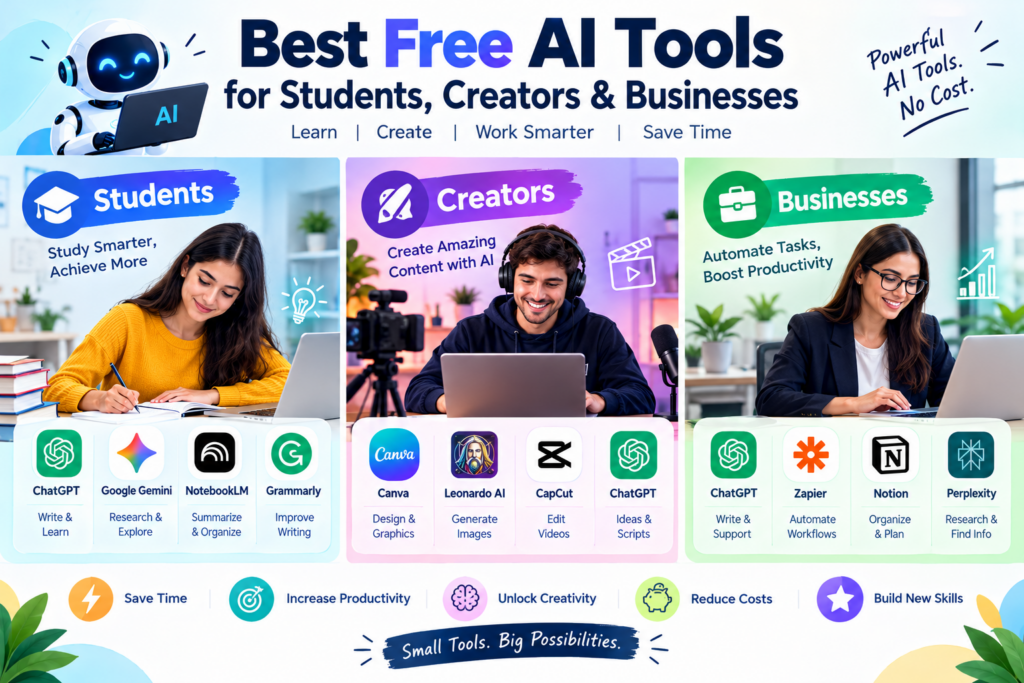
Artificial intelligence (AI) is changing how students learn, how creators produce content, and how businesses manage their daily operations. Tasks that once required hours of manual effort can now be completed faster with the help of AI-powered applications.
The good news is that you don’t always need an expensive subscription to benefit from AI. Many popular platforms offer free plans or free versions that help users write content, generate images, conduct research, create presentations, edit videos, and automate repetitive tasks.
Whether you are a student preparing for exams, a YouTuber creating videos, a blogger growing a website, or a business owner looking to improve productivity, the right AI tools can make your work easier.
In this guide, we explore the best free AI tools for students, creators, and businesses in 2026, including their features, benefits, and practical uses.
Table of Contents
What Are AI Tools?
AI tools are software applications that use artificial intelligence to perform or assist with tasks that typically require human intelligence.
These tasks may include understanding language, generating text and images, analyzing information, answering questions, editing videos, and automating workflows.
For example, an AI writing assistant can help draft an article, an AI research tool can summarize information from sources, and an AI design tool can create graphics for social media.
Many AI platforms provide free access with limitations on usage, features, or the number of requests. Therefore, it is important to check each platform’s current free-plan terms before choosing a tool.
Best Free AI Tools at a Glance
| AI Tool | Best For | Main Use |
|---|---|---|
| ChatGPT | Students and businesses | Writing, explanations, brainstorming |
| Google Gemini | Students and everyday users | Learning, research assistance, ideas |
| Perplexity | Researchers | Web research and sourced answers |
| Grammarly | Students and writers | Grammar and writing improvement |
| Canva | Creators and businesses | Graphics, presentations, designs |
| Leonardo AI | Designers and creators | AI-generated images |
| CapCut | YouTubers and creators | Video editing and captions |
| Notion | Teams and students | Notes, documents, organization |
| NotebookLM | Students and researchers | Source-based summaries and study |
| Zapier | Businesses | Connecting apps and automating workflows |
Note: These tools have offered free access or free-plan options, but limits and feature availability can change. Some AI features require paid subscriptions.
1. Best Free AI Tools for Students

AI tools can help students understand difficult topics, organize study materials, practice questions, and improve their writing. They work best as learning assistants rather than replacements for independent thinking.
ChatGPT — For Learning and Problem-Solving
ChatGPT can explain complex topics in simple language, provide examples, create practice quizzes, and help students revise for examinations.
Key uses:
- Understand difficult concepts step by step.
- Generate practice questions and mock tests.
- Summarize notes and organize revision plans.
- Improve essays, grammar, and vocabulary.
- Learn basic programming concepts.
Example prompt: “Explain surface area and volume for Class 9 with formulas, examples, and 10 practice questions.”
Best for: School students, college students, and independent learners.
Google Gemini — For Study Assistance
Google Gemini can assist with explanations, brainstorming, summaries, and questions about academic topics.
Students can use it to explore unfamiliar concepts, develop project ideas, and prepare revision notes.
Best for: General learning, brainstorming, and study support.
NotebookLM — For Notes and Research
NotebookLM is especially useful when students need to study from their own materials. It can help analyze uploaded or supported sources, generate summaries, and identify important ideas.
Key benefits:
- Summarize study materials.
- Generate study guides and FAQs.
- Identify important topics in documents.
- Ask questions grounded in provided sources.
Best for: Exam preparation, research projects, and revision.
Grammarly — For Writing Improvement
Grammarly helps users identify grammar, spelling, punctuation, and clarity issues. Its available free features can help students improve assignments, emails, and essays.
Best for: English writing, proofreading, and communication.
2. Best Free AI Tools for Content Creators

j

Content creators often need to produce articles, videos, thumbnails, social media posts, and graphics regularly. AI tools can reduce production time and help creators generate new ideas.
Canva — For Graphic Design
Canva offers a free design plan with templates and selected AI-powered features, depending on availability and usage limits.
Creators can use it to design YouTube thumbnails, blog graphics, Instagram posts, presentations, and promotional materials.
Best for: Bloggers, social media managers, marketers, and YouTubers.
Leonardo AI — For AI Image Generation
Leonardo AI provides image-generation capabilities and has offered limited free usage. It can help creators develop visual concepts, illustrations, and artwork.
Best for: Digital artists, designers, and creators who need original visuals.
CapCut — For Video Editing
CapCut provides video editing tools, including selected AI-assisted features. Depending on the platform and region, available features and free access may vary.
Creators can use it to trim footage, add captions, improve video presentation, and prepare short-form content.
Best for: YouTubers, Instagram creators, and video editors.
ChatGPT — For Content Ideas and Scripts
ChatGPT can help creators develop content plans, write video scripts, generate titles, and brainstorm social media captions.
For example, a technology blogger can use it to create an outline for an article about AI trends, then fact-check and edit the article before publishing.
Best for: Blog writing, YouTube scripts, content calendars, and brainstorming.
3. Best Free AI Tools for Businesses
Businesses can use AI to improve customer communication, draft documents, organize information, analyze data, and automate repetitive processes.
ChatGPT — For Business Productivity
ChatGPT can assist with everyday business tasks such as drafting emails, creating proposals, summarizing documents, brainstorming campaigns, and preparing report outlines.
Example: A small business owner can generate a first draft of a product description and refine it for their target audience.
Zapier — For Workflow Automation
Zapier connects supported applications and allows users to create automated workflows, often called Zaps.
For example:
- A customer submits a website contact form.
- Their details are added to a spreadsheet or CRM.
- The business receives a notification.
- An automated confirmation email is sent.
Zapier has offered a free plan with usage and feature restrictions. Check its current limits before building business-critical workflows.
Best for: Lead management, repetitive data transfers, notifications, and app integrations.
Notion — For Team Organization
Notion can help businesses organize tasks, documents, meeting notes, and project information. Selected AI capabilities may require a paid plan or be subject to specific access limits.
Best for: Project management, documentation, and team knowledge bases.
Perplexity — For Market Research
Perplexity can help users explore topics, discover sources, and investigate competitors or industry trends.
Businesses should verify important facts using original sources before making financial, legal, or strategic decisions.
Best for: Preliminary market research, competitor discovery, and finding relevant references.
4. How to Choose the Right Free AI Tool
The best AI tool depends on what you need to accomplish. Instead of signing up for every platform, start with one tool for your most time-consuming task.
| Your Goal | Recommended Starting Tool |
|---|---|
| Understand difficult subjects | ChatGPT |
| Research a topic | Perplexity |
| Summarize your study materials | NotebookLM |
| Improve writing | Grammarly |
| Create social media graphics | Canva |
| Generate images | Leonardo AI |
| Edit videos | CapCut |
| Organize projects | Notion |
| Automate repetitive app workflows | Zapier |
Before selecting a tool, consider these factors:
- Free-plan limits: Check daily usage, credits, storage, and feature restrictions.
- Ease of use: Choose an application that fits your skill level.
- Privacy: Avoid uploading sensitive personal, educational, or business information without understanding the provider’s data policies.
- Output quality: Review AI-generated text, images, and analysis before using them.
- Integrations: Check whether the tool works with your existing applications.
5. Benefits of Using Free AI Tools
Save Time
AI can speed up repetitive activities such as summarizing documents, drafting emails, and preparing content outlines.
Improve Productivity
By reducing routine work, AI gives users more time to focus on important projects, learning, and creative tasks.
Support Creativity
AI can suggest ideas, alternative headlines, design concepts, and content formats when you need inspiration.
Learn New Skills
Students and beginners can use AI explanations, practice exercises, and guided examples to explore unfamiliar subjects.
Reduce Initial Costs
Free plans allow individuals and small businesses to experiment with AI before investing in paid subscriptions.
6. Limitations You Should Know
Although AI tools are useful, they are not perfect.
- AI can generate incorrect or outdated information.
- Free plans may have limited usage and features.
- Generated content may require editing to match your voice and goals.
- AI-generated research needs fact-checking.
- Privacy and copyright considerations vary between services.
- Some workflows still require human judgment and approval.
Important: Never submit AI-generated assignments as your own work when your school or institution prohibits it. Use AI to learn, practice, and improve your understanding.
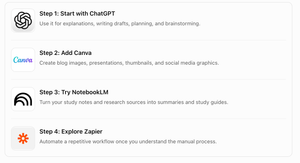
7. Best Free AI Tools for Beginners: A Simple Starter Plan
If you are new to AI, you can start with a small collection of tools rather than using everything at once.
Conclusion
The best free AI tools for students, creators, and businesses make it easier to learn, create, research, and manage everyday work without requiring a large initial budget.
Students can use ChatGPT and NotebookLM for study support. Content creators can explore Canva, Leonardo AI, and CapCut for visual and video production. Businesses can use ChatGPT, Notion, Perplexity, and Zapier to support communication, research, organization, and workflow automation.
The smartest approach is to choose tools based on your needs, test their free features, and verify their results.
AI is not a substitute for human creativity or critical thinking. It is a powerful assistant that can help you work more efficiently when used responsibly.
Start with one free AI tool today, explore its capabilities, and discover how it can improve your productivity.


Pingback: AI Automation: How Companies Are Saving Time and Money - Techgrav
Pingback: Future of AI: What Will Artificial Intelligence Look Like in 2030? - Techgrav
Pingback: Best Free AI Presentation Makers in 2026 - Techgrav