Creating high-performing Facebook advertisements requires more than an attractive image and a catchy headline. Businesses need engaging visuals, persuasive copy, compelling videos, and multiple creative variations to capture attention and encourage customers to take action.
In 2027, artificial intelligence is expected to remain an important part of digital advertising workflows. AI-powered tools can help marketers generate ad images, write persuasive headlines, create product videos, design promotional graphics, and produce different versions of an advertisement without starting from scratch.
Whether you run an e-commerce store, manage a digital marketing agency, promote affiliate products, or operate a small business, the right AI tools can simplify your advertising workflow.
The best AI tools for Facebook ad creative help you reduce production time, experiment with different marketing messages, maintain consistent branding, and prepare advertisements for Facebook and Instagram campaigns.
In this guide, we will explore 10 AI tools worth considering for Facebook ad creative in 2027, including their features, advantages, limitations, and ideal use cases.
Note: The recommendations below are based on tools available in 2026. Their features, pricing, and availability should be verified before making purchasing decisions in 2027.
Table of Contents
What are AI Tools for Facebook Ad Creative?
AI tools for Facebook ad creative are software applications that use artificial intelligence to help businesses create advertising materials for Facebook and other Meta platforms.
These tools can generate images, write advertising copy, produce short videos, create product advertisements, and adapt existing designs for different placements.
For example, an online store selling skincare products could upload a product photograph and use an AI ad generator to create several promotional designs with different headlines, backgrounds, and calls to action.
Similarly, a marketing agency could use an AI video generator to develop short promotional clips for Facebook Reels and Instagram Stories.
Benefits of Using AI for Facebook Advertising
Here are some important benefits of using AI-powered creative tools:
- Faster ad creation: Generate initial designs and advertising copy in less time.
- Creative variation: Develop different headlines, visuals, and promotional concepts.
- Lower production workload: Reduce repetitive design and editing tasks.
- Video advertising: Create promotional videos and product demonstrations.
- Brand consistency: Reuse approved colors, logos, and brand assets.
- Simplified testing: Prepare multiple creative concepts to evaluate through advertising campaigns.
AI does not guarantee better advertising results. Campaign performance still depends on your offer, audience, product, landing page, creative quality, and testing process.
10 Best AI Tools for Facebook Ad Creative in 2027
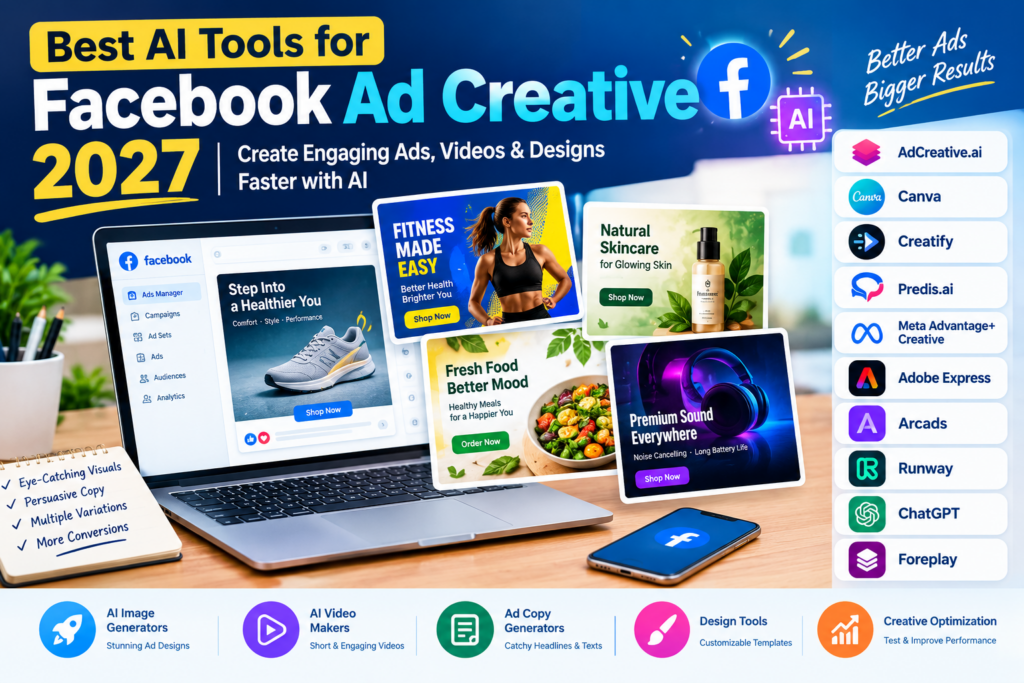
The following tools cover different advertising needs, from static image generation and video production to design customization and creative optimization.
1. AdCreative.ai — Best for Generating Facebook Ad Creatives
AdCreative.ai is an AI-powered advertising platform designed to help businesses generate promotional visuals and advertising assets.
It is particularly relevant for marketers who need multiple creative variations for product promotions, lead generation, and e-commerce campaigns.
Instead of designing every advertisement manually, users can provide brand information, upload relevant assets, and generate creative concepts for further review.
Key Features:
- AI-generated advertising visuals.
- Multiple creative variations.
- Advertising copy and headline generation.
- Brand asset customization.
- Creative scoring and analysis features, depending on the plan.
- Support for advertising workflows across multiple platforms.
Pros:
- Useful for generating multiple ad concepts.
- Helps reduce repetitive design work.
- Suitable for businesses without dedicated designers.
- Supports structured creative production.
Cons:
- Advanced features may require a paid subscription.
- AI-generated designs can require manual adjustments.
- Performance scores should not be treated as guarantees of actual campaign results.
Best For: E-commerce businesses, digital marketers, freelancers, and advertising agencies.
Why Choose It?
AdCreative.ai is worth considering if your primary goal is to generate multiple advertising designs quickly and streamline your creative production process.
2. Canva — Best for Beginner-Friendly Facebook Ad Design
Canva is a popular design platform offering templates, image editing, and AI-powered creative features.
It is especially useful for people who want control over their Facebook advertisements without needing professional graphic design experience.
With Canva, you can create promotional graphics, product advertisements, carousel designs, and social media visuals using customizable templates.
Key Features:
- Facebook ad design templates.
- AI-assisted content and image creation.
- Drag-and-drop editor.
- Brand colors, fonts, and logos.
- Image editing and background removal features, depending on the plan.
- Design resizing for different social media placements.
Pros:
- Beginner-friendly interface.
- Flexible design customization.
- Large collection of templates and visual assets.
- Useful for creating both organic social content and paid advertisements.
Cons:
- Some assets and AI features require payment.
- Designs may need manual optimization for advertising placements.
- Templates can look generic without customization.
Best For: Small businesses, freelancers, content creators, and social media managers.
Why Choose It?
Canva is an excellent starting point if you want an accessible design tool that combines AI assistance with hands-on creative control.
3. Creatify — Best for AI Video Ads
Creatify focuses on AI-powered video advertising and helps businesses turn product information into short promotional videos.
It can be useful for e-commerce brands that want to create video ads without organizing a traditional filming session for every campaign.
Depending on the available features and plan, users can work with product information, scripts, AI presenters, and generated video content.
Key Features:
- AI-powered product video generation.
- Product-page-to-video workflows.
- AI presenter and avatar options.
- Automated scripts and voiceovers.
- Short-form video creative variations.
- Video production for social advertising.
Pros:
- Useful for product-focused advertising.
- Helps accelerate video production.
- Supports experimentation with different scripts and messages.
- Can reduce the need for repeated filming.
Cons:
- Some outputs may appear artificial without editing.
- Premium video generation may require a paid plan.
- Product details and advertising claims must be reviewed carefully.
Best For: E-commerce brands, dropshippers, product marketers, and performance marketing agencies.
Why Choose It?
Creatify is worth exploring if you want to experiment with video advertising and produce multiple versions of a product promotion efficiently.
4. Predis.ai — Best for Social Media Ad Content
Predis.ai offers AI-assisted social media content creation, helping businesses develop marketing visuals, captions, and promotional content.
It can support workflows that involve creating both organic social posts and advertising creative for platforms such as Facebook and Instagram.
Key Features:
- AI-assisted social media content generation.
- Promotional graphic creation.
- Caption and copy generation.
- Template-based creative design.
- Content planning and publishing features, depending on the plan.
- Support for multiple social media formats.
Pros:
- Useful for managing multiple content types.
- Helps generate creative ideas and captions.
- Suitable for small marketing teams.
- Combines several social media tasks in one workflow.
Cons:
- Advanced functionality may require a subscription.
- AI-generated captions may need brand-specific editing.
- Not every feature is designed exclusively for paid Facebook advertising.
Best For: Small businesses, social media agencies, online stores, and marketing freelancers.
Why Choose It?
Predis.ai is a practical option if you want to combine social media content creation with your Facebook advertising workflow.
5. Meta Advantage+ Creative — Best for Native Facebook Ad Enhancements
Meta Advantage+ Creative is particularly relevant because it operates within Meta’s advertising ecosystem.
Rather than relying entirely on an external design platform, advertisers can use supported creative enhancements and automation features when preparing campaigns in Meta Ads Manager.
Depending on eligibility, placement, and current feature availability, these tools may help adapt creative assets or generate variations for different advertising experiences.
Key Features:
- AI-assisted creative enhancements.
- Supported image and video adaptations.
- Creative variations for eligible placements.
- Integration with Meta Ads Manager.
- Advertising workflow automation and optimization features.
Pros:
- Works within Meta’s advertising environment.
- Reduces the need to move assets between multiple tools.
- Useful for advertisers already managing Facebook campaigns.
- Some creative features are available without a separate creative-tool subscription.
Cons:
- Available enhancements depend on the campaign and account.
- Advertisers may have less control over certain automated changes.
- It is not a replacement for a complete graphic design or video editing platform.
Best For: Facebook advertisers, performance marketers, small businesses, and agencies running Meta campaigns.
Why Choose It?
Meta Advantage+ Creative should be on your shortlist if you want to explore native AI-assisted advertising features before paying for another creative generation tool.
6. Adobe Express — Best for Branded Advertising Graphics
Adobe Express is a design platform that combines templates, image editing, and AI-assisted creative features.
It is useful for creating branded promotional graphics, product advertisements, and social media content.
Businesses that already use Adobe products may appreciate its design workflow and access to related creative tools.
Key Features:
- Social media ad templates.
- AI-assisted image creation and editing.
- Background removal and image adjustments.
- Text and typography customization.
- Brand asset management features, depending on the plan.
- Resizing and exporting for supported formats.
Pros:
- Suitable for branded marketing materials.
- Offers accessible design and editing tools.
- Useful for maintaining consistent visual identity.
- Supports different types of promotional content.
Cons:
- Some advanced AI features require a paid plan.
- Complex advertisements may still require additional design work.
- AI-generated visuals should be reviewed for product accuracy.
Best For: Small businesses, marketing teams, freelancers, and brands that need consistent visual designs.
Why Choose It?
Adobe Express is worth considering when brand consistency and customizable promotional graphics matter more than fully automated ad generation.
7. Arcads — Best for AI Presenter and UGC-Style Ads
Arcads focuses on AI-generated advertising videos featuring virtual actors.
These videos can be useful for testing different advertising scripts, product introductions, and spokesperson-style presentations.
For businesses that want to experiment with user-generated-content-style advertising, AI presenters can provide an alternative to filming every creative concept.
Key Features:
- AI-generated presenter videos.
- Script-based video creation.
- Multiple virtual actor options.
- Voice and delivery variations, depending on available features.
- Short-form advertising video production.
Pros:
- Useful for testing different video hooks.
- Reduces the need to arrange every filming session.
- Supports rapid creative experimentation.
- Suitable for products that benefit from demonstrations or explanations.
Cons:
- AI presenters may not feel as authentic as real customers.
- Some audiences may respond better to genuine customer experiences.
- Subscription costs may be unsuitable for beginners.
- Advertising claims and any implied testimonials require careful review.
Best For: Performance marketers, direct-to-consumer brands, and agencies producing short-form video advertisements.
Why Choose It?
Arcads is an option for marketers who want to explore presenter-led advertising without producing every video from scratch.
8. Runway — Best for Creative AI Video Production
Runway provides AI-powered tools for generating and editing video content.
While it is not exclusively a Facebook ad generator, its video capabilities can help marketers develop original visual concepts and promotional clips.
It is particularly relevant when the advertising concept requires more visual storytelling than a simple product image or template.
Key Features:
- AI video generation.
- Video editing and transformation tools.
- Image-to-video workflows.
- Creative visual effects.
- Tools for developing short promotional clips.
Pros:
- Supports visually distinctive video concepts.
- Useful for creating original campaign assets.
- Can help develop video variations from existing creative material.
- Offers more creative flexibility than many template-only tools.
Cons:
- Generation credits may be limited.
- Outputs can require editing and refinement.
- Complex product demonstrations may not accurately represent real-world functionality.
Best For: Creative agencies, video marketers, and brands producing visually distinctive advertising campaigns.
Why Choose It?
Runway is worth considering if your Facebook advertising strategy depends on original video concepts and you have time to refine AI-generated footage.
9. ChatGPT — Best for Facebook Ad Copy and Creative Ideas
ChatGPT can help marketers develop Facebook ad concepts, write headlines, generate promotional copy, and plan creative testing.
It is not a dedicated Facebook ad publishing platform, but it can support the planning and content creation stages of advertising.
For example, you can describe your product, audience, offer, and campaign objective and request several different creative approaches.
Key Features:
- Facebook ad headline generation.
- Primary text and call-to-action suggestions.
- Creative angle brainstorming.
- Video ad script writing.
- Customer persona and messaging development.
- Creative testing plans.
Pros:
- Useful for generating multiple copy variations.
- Can adapt messaging to different audiences.
- Helps organize campaign concepts.
- Supports brainstorming and creative planning.
Cons:
- Generated claims require verification.
- Copy alone does not produce a complete, campaign-ready advertisement.
- Product images and final layouts may require separate tools.
- Strong results depend on the quality of the instructions and product information.
Best For: Copywriters, marketers, entrepreneurs, agencies, and small businesses.
Why Choose It?
ChatGPT can complement an image or video generator by helping you create the advertising message before producing the final creative assets.
10. Foreplay — Best for Facebook Ad Research and Inspiration
Foreplay is an advertising research and creative organization platform that helps marketers collect and analyze advertising examples.
It is particularly useful during the planning stage, when you need inspiration or want to understand how other brands present their products.
It should not be confused with a tool that automatically creates every finished advertisement. Its value is primarily in research, creative discovery, and planning.
Key Features:
- Advertising inspiration and creative collections.
- Swipe-file organization.
- Competitor creative research features.
- Creative briefing and collaboration workflows.
- Tools for organizing advertising references.
Pros:
- Helps organize research and inspiration.
- Useful for developing creative briefs.
- Supports collaboration between marketers and designers.
- Can help identify different advertising approaches to test.
Cons:
- It does not replace a complete design or video production tool.
- Some features require a paid plan.
- Competitor examples do not guarantee that a similar ad will perform well for your business.
Best For: Advertising agencies, creative strategists, media buyers, and performance marketing teams.
Why Choose It?
Foreplay is worth considering if your main challenge is finding new advertising concepts rather than producing the actual designs.
Comparison of the Best AI Tools for Facebook Ad Creative in 2027
Here is a quick comparison to help you choose the right platform.
| AI Tool | Best For | Main Capability | Suitable for Beginners? |
|---|---|---|---|
| AdCreative.ai | Static ad generation | AI-generated advertising visuals | Yes |
| Canva | Custom ad design | Templates and AI-assisted editing | Yes |
| Creatify | Product video ads | AI video generation | Yes |
| Predis.ai | Social media content | Graphics and marketing copy | Yes |
| Meta Advantage+ Creative | Native Meta campaigns | Automated creative enhancements | Yes |
| Adobe Express | Branded graphics | Design and image editing | Yes |
| Arcads | Presenter-style videos | AI actors and video ads | Best with a clear script |
| Runway | Original video concepts | AI video generation and editing | Requires experimentation |
| ChatGPT | Ad copy and ideation | Headlines, scripts, and creative strategy | Yes |
| Foreplay | Creative research | Advertising inspiration and organization | Yes |
Important: This comparison describes the primary use case of each platform, not a verified ranking of advertising performance. Free access, pricing, and features may change before 2027.
How to Choose the Best AI Facebook Ad Creative Tool
Choosing the right AI tool depends on your advertising objectives, available budget, and preferred creative format.
1. Identify Your Main Advertising Goal
Start by deciding what you want your advertisement to achieve.
For example:
- E-commerce sales: Focus on product images, demonstrations, offers, and video ads.
- Lead generation: Create clear promotional graphics and compelling calls to action.
- Brand awareness: Develop visually distinctive creative concepts.
- Affiliate marketing: Test different hooks and product benefits while following applicable advertising policies.
- Local business promotion: Highlight your services, location, and genuine customer benefits.
A tool that is excellent for video production may not be the best choice for creating dozens of static advertisements.
2. Consider Your Budget
Some platforms offer free plans, while others rely on subscriptions, generation credits, or usage-based pricing.
If you are starting with a small advertising budget, consider testing free design tools and the creative features available in Meta Ads Manager before purchasing several subscriptions.
Remember that software costs and advertising spend are separate expenses.
3. Check Image and Video Capabilities
Different advertising formats require different production workflows.
If your strategy relies on static images and carousels, Canva or AdCreative.ai may be appropriate options.
If you want product videos or AI presenters, consider Creatify or Arcads.
If you need original video concepts, explore Runway.
4. Look for Brand Customization
Your advertisements should maintain a consistent brand identity.
Check whether the tool supports your brand colors, typography, logos, product images, and preferred writing style.
Always review generated visuals to ensure that product packaging, features, and other important details are represented accurately.
5. Evaluate Creative Testing Features
Generating more advertisements is useful only when you can identify which concepts work best.
Look for tools that help you organize variations, manage creative assets, or analyze performance data.
Use actual campaign results to assess success rather than relying exclusively on AI-generated predictions.
How to Create Facebook Ad Creatives Using AI
You can create an AI-assisted Facebook advertisement by following these steps.
Step 1: Define Your Product and Audience
Start with a clear description of the product or service you want to promote.
Identify your target customers, the problem your product solves, and the offer you want to communicate.
For example, an online fitness store might want to promote a home workout accessory to people interested in exercising at home.
Step 2: Develop an Advertising Concept
Use ChatGPT or another writing assistant to brainstorm advertising angles.
For the same product, you could explore:
- A problem-and-solution concept.
- A product demonstration.
- A feature-focused advertisement.
- A promotional offer.
- A lifestyle-oriented visual.
Choose concepts that accurately represent the product and are relevant to your intended audience.
Step 3: Generate the Visual
Choose a design tool based on your preferred format.
For example, use Canva for a customizable image advertisement or Creatify for an AI-generated product video.
Provide approved product images, brand assets, and clear instructions.
Step 4: Write the Ad Copy
Develop a headline, primary text, and call to action that clearly communicate your offer.
Keep the message specific and easy to understand.
Avoid exaggerated claims, misleading promises, or unsupported statements about product performance.
Step 5: Prepare Multiple Creative Variations
Instead of producing several nearly identical advertisements, experiment with meaningful differences.
You could change the main benefit, opening hook, visual composition, product demonstration, or offer presentation.
Keep track of which concept each advertisement is designed to test.
Step 6: Review and Launch Your Campaign
Before publishing, check the creative for spelling errors, product accuracy, brand consistency, mobile readability, and compliance with applicable Meta advertising policies.
Once your advertisements are ready, upload them to Meta Ads Manager and select the appropriate campaign objective and placements.
Monitor actual performance and use the results to guide your next creative decisions.
Example AI Prompt for Facebook Ad Creative
You can use the following prompt with an AI writing assistant to develop an initial creative brief.
Prompt:
“Act as an experienced Facebook advertising creative strategist. Create five distinct advertising concepts for my product.
Product: [Enter product name]
Target audience: [Describe your audience]
Main benefit: [Enter the primary benefit]
Offer: [Enter your offer]
Campaign objective: [Sales, leads, or brand awareness]
For each concept, provide a visual direction, headline, primary ad text, call to action, and a short image-generation prompt. Keep the messaging clear, accurate, and suitable for mobile users. Do not invent product features, customer testimonials, or performance statistics.”
You can then use a design or video generation tool to turn your chosen concept into a visual advertisement.
Review every generated result before publishing.
Common Mistakes to Avoid When Using AI for Facebook Ads
Although AI can accelerate creative production, it can also introduce mistakes that affect the quality of your advertisements.
Using Generic AI-Generated Designs
Advertisements that look similar to countless other AI-generated graphics may struggle to communicate what makes your brand different.
Use real product images, specific benefits, and distinctive creative concepts to make your advertising more relevant.
Publishing Without Reviewing the Content
AI-generated text may contain spelling mistakes, unsupported claims, or inaccurate product details.
Review all creative assets before they go live.
Creating Variations Without a Clear Purpose
Producing many nearly identical advertisements does not necessarily provide useful testing insights.
Develop variations that explore different messaging angles, visual approaches, or customer benefits.
Ignoring Mobile Readability
Most social media advertisements need to communicate their message quickly on small screens.
Use readable text, clear product imagery, and an obvious call to action. Check that essential information remains visible in the intended placement.
Expecting AI to Guarantee Results
No AI tool can guarantee sales, conversions, or a lower cost per acquisition.
Treat AI-generated advertisements as creative hypotheses. Use campaign data to determine which concepts deserve further testing.
Frequently Asked Questions (FAQs)
1. What are the best AI tools for Facebook ad creative in 2027?
Tools worth considering include AdCreative.ai, Canva, Creatify, Predis.ai, Meta Advantage+ Creative, Adobe Express, Arcads, Runway, ChatGPT, and Foreplay. Each serves a different purpose, from creating images and videos to writing copy and researching advertising concepts.
2. What is the best free AI tool for Facebook ad creative?
Canva offers a useful free starting point for designing advertisements, while Meta Advantage+ Creative provides supported creative enhancements within Meta’s advertising workflow. ChatGPT may also help with brainstorming and writing ad copy, subject to the features available on your plan.
Check current free-plan limitations before choosing a tool.
3. Can AI create Facebook ads automatically?
Yes. Some AI tools can generate advertising images, headlines, copy, and videos from prompts or product information. However, the level of automation varies. Most businesses should review the final assets and confirm campaign settings before publishing.
4. Which AI tool is best for Facebook video ads?
Creatify is worth considering for product-focused AI video advertisements. Arcads is an option for presenter-style videos, while Runway offers broader AI video generation and editing capabilities.
The best choice depends on your creative format and workflow.
5. Can I use AI-generated images in Facebook ads?
AI-generated images can be used in advertising when they comply with applicable platform policies, intellectual property requirements, and relevant laws. You should also review any applicable disclosure requirements and ensure that the images do not misrepresent your product or offer.
6. Do AI Facebook ad generators improve conversion rates?
They can help marketers produce and test more creative concepts, but they do not automatically improve conversion rates. Actual results depend on the product, offer, audience, landing page, campaign setup, and quality of the creative.
Measure performance using your own campaign data.
7. Is an AI ad generator better than Canva?
Neither is universally better. Dedicated ad generators may be more convenient for producing advertising variations quickly, while Canva provides flexible design editing and customization.
Choose the tool that best matches your production needs.
8. Are AI tools useful for Facebook ads for small businesses?
Yes. Small businesses can use AI tools to develop promotional graphics, write advertising copy, create product videos, and test different messages without maintaining a large creative team.
Starting with one or two tools is often more practical than paying for several overlapping subscriptions.
Conclusion
The best AI tools for Facebook ad creative in 2027 will depend on how you plan to produce, manage, and test your advertising assets.
AdCreative.ai is worth considering for static ad generation, Canva offers flexible design customization, and Creatify supports product-focused video creation. Meta Advantage+ Creative provides native creative enhancements, while ChatGPT can help develop advertising concepts and copy.
For presenter-style videos, consider Arcads. For original AI video concepts, explore Runway. Predis.ai and Adobe Express offer additional options for social media content and branded designs, while Foreplay can help with advertising research and inspiration.
Our recommendation: If you are a beginner, start with Canva and ChatGPT for design and copywriting, then explore Meta’s native creative features. If you run an e-commerce business and need more product advertisements, evaluate a specialized tool such as AdCreative.ai or Creatify.
Most importantly, focus on creative quality, accurate messaging, and meaningful testing rather than simply generating more advertisements.
By combining AI-assisted production with thoughtful creative strategy and real campaign data, businesses can build a more efficient Facebook advertising workflow for 2027.